

Prerequisites
Configure SonarQube integration in Backstage
Integrations are configured at the root level ofapp-config.yaml. Here’s an example configuration for SonarQube:
sonarqube.org/project-key annotation from the entity configuration.
Entity configuration
In yourcatalog-info.yaml file, add sonarqube.org/project-key metadata annotation to allow the plugin to map an entity to a project in SonarQube.
sonarqube.org/project-key metadata annotation is prefixed with the corresponding
SonarQube instance name configured at soundcheck.collectors.sonarqube.name:
sonarqube.org/organization-key metadata annotation to allow the plugin to map an entity to an organization in SonarQube Cloud.
Permissions
The token used for authentication must have the necessary permissions to access the SonarQube API. Listed below are the permissions required for each fact supported by this collector:issues- Requires the ‘Browse’ permission on the specified project(s).
measures- Requires the ‘Browse’ permission on the specified project(s).
projects- Requires ‘Administer System’ permission.
project-tags- Requires the ‘Browse’ permission on the specified project(s).
Add the SonarQubeFactCollector to Soundcheck
First, add the package:packages/backend/src/index.ts file:
packages/backend/src/index.ts
Plugin Configuration
The collection of SonarQube facts is driven by configuration. To learn more about the configuration, consult the Defining SonarQube Fact Collectors section. SonarQube Fact Collector can be configured via YAML or No-Code UI. If you configure it via both YAML and No-Code UI, the configurations will be merged. It’s preferable to choose a single source for the Fact Collectors configuration (either No-Code UI or YAML) to avoid confusing merge results.No-Code UI Configuration Option
- Make sure the prerequisite Configure SonarQube integration in Backstage is completed and SonarQube instance details are configured.
-
To enable the SonarQube Integration, go to
Soundcheck > Integrations > SonarQubeand click theConfigurebutton. To learn more about the No-Code UI config, see the Configuring a fact collector (integration) via the no-code UI.
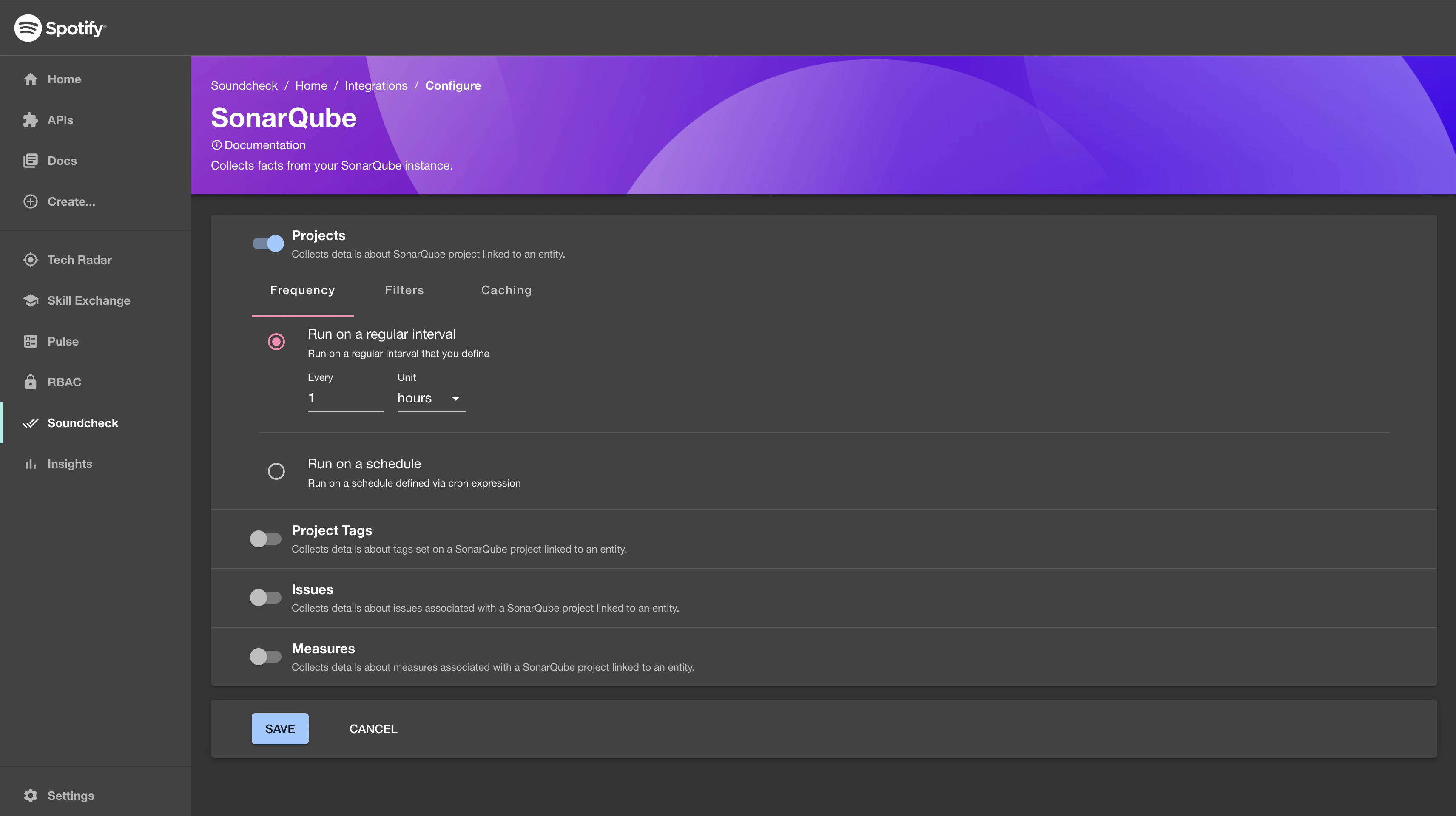
YAML Configuration Option
-
Create a
sonarqube-facts-collectors.yamlfile in the root of your Backstage repository and fill in all your SonarQube fact collectors. A simple example SonarQube fact collector is listed below.Note: this file will be loaded at runtime along with the rest of your Backstage configuration files, so make sure it’s available in deployed environments in the same way as yourapp-config.yamlfiles. -
Add a Soundcheck collectors field to the
app-config.yamland reference the newly createdsonarqube-facts-collectors.yamlfile.
Rate Limiting (Optional)
This fact collector can be rate limited in Soundcheck using the following configuration:Defining SonarQube Fact Collectors
This section describes the data shape and semantics of SonarQube fact collectors. The following is an example of a descriptor file for a SonarQube fact collector:name [optional]
The unique identifier of the SonarQube instance. Omit if you are using a single SonarQube instance.
If you are using multiple SonarQube instances, make sure the sonarqube.org/project-key entity annotations
contain this name as prefix as described in the entity configuration section.
baseUrl [optional]
The base URL of the SonarQube instance to use. If not provided, the plugin will attempt to use the default URL https://sonarqube.com.
token [optional]
The SonarQube token to use for authentication. If not provided, the plugin will attempt to use username and password instead.
username [optional]
The SonarQube username to use for authentication. If not provided, the plugin will attempt to use token instead.
password [optional]
The SonarQube password to use for authentication. If not provided, the plugin will attempt to use token instead.
frequency [optional]
The frequency at which the collection should be executed. Possible values are either a cron expression { cron: ... } or HumanDuration.
This is the default frequency for each collector.
Example:
initialDelay [optional]
The amount of time that should pass before the first invocation happens. Possible values are either a cron expression { cron: ... } or HumanDuration.
This is the default initial delay for each collector.
Example:
batchSize [optional]
The number of entities to collect facts for at once. Optional, the default value is 1.
This is the default batch size for each collector.
Note: Fact collection for a batch of entities is still considered as one hit towards the rate limits
by the Soundcheck Rate Limiting engine, while the actual number of hits
will be equal to the batchSize.
Example:
filter [optional]
A filter specifying which entities to collect the specified facts for. Matches the filter format used by the Catalog API.
This is the default filter for each collector.
See filters for more details.
exclude [optional]
Entities matching this filter will be skipped during the fact collection process. Can be used in combination with filter. Matches the filter format used by the Catalog API.
This is the default exclude filter for each collector.
Example:
cache [optional]
If the collected facts should be cached, and if so for how long. Possible values are either true or false or a nested { duration: HumanDuration } field.
This is the default cache config for each collector.
Example:
collects [required]
An array describing which facts to collect and how to collect them. See below for details about the fact collector configuration.
Fact Collector Configuration
Each collector supports the fields described below.factName [optional]
The name of the fact to be collected (must be unique). If not provided, fact type will be used as a name.
- Minimum length of 1
- Maximum length of 100
- Alphanumeric with single separator instances of periods, dashes, underscores, or forward slashes
type [required]
The type of the collector (e.g. projects, project-tags, issues, measures).
frequency [optional]
The frequency at which the fact collection should be executed. Possible values are either a cron expression { cron: ... } or HumanDuration.
If provided, it overrides the default frequency provided at the top level. If not provided, it defaults to the frequency provided at the top level. If neither collector’s frequency, nor default frequency is provided, the fact will only be collected on demand.
Example:
initialDelay [optional]
The amount of time that should pass before the first invocation happens. Possible values are either a cron expression { cron: ... } or HumanDuration.
If provided, it overrides the default initial delay provided at the top level. If not provided, it defaults to the initial delay provided at the top level. If neither collector’s initial delay nor default initial delay is provided, the initial delay will be calculated automatically.
Example:
batchSize [optional]
The number of entities to collect facts for at once.
If provided, it overrides the default batch size provided at the top level. If not provided, it defaults to the batch size provided at the top level. If neither collector’s batch size, nor default batch size is provided, the batch size will be defaulted to 1.
Note: Fact collection for a batch of entities is still considered as one hit towards the rate limits
by the Soundcheck Rate Limiting engine, while the actual number of hits
will be equal to the batchSize.
Example:
filter [optional]
A filter specifying which entities to collect the specified facts for. Matches the filter format used by the Catalog API.
If provided, it overrides the default filter provided at the top level. If not provided, it defaults to the filter provided at the top level. If neither collector’s filter nor default filter is provided, the fact will be collected for all entities.
See filters for more details.
exclude [optional]
Entities matching this filter will be skipped during the fact collection process. Can be used in combination with filter. Matches the filter format used by the Catalog API.
If provided, it overrides the default exclude filter provided at the top level. If not provided, it defaults to the exclude filter provided at the top level. If neither collector’s exclude filter nor default exclude filter is provided, only the inclusion filter will be applied.
Example:
cache [optional]
If the collected facts should be cached, and if so for how long. Possible values are either true or false or a nested { duration: HumanDuration } field.
If provided it, overrides the default cache config provided at the top level. If not provided, it defaults to the cache config provided at the top level. If neither collector’s cache nor default cache config is provided, the fact will not be cached.
Example:
Collecting Projects Fact
Theprojects fact contains information about the entity’s project from SonarQube Projects API.
Shape of A Projects Fact Collector
The shape of aprojects fact collector matches the Fact Collector Configuration (restriction: type: projects).
Here’s an example of the projects fact collector configuration:
Shape of A Projects Fact
The following is an example response from theprojects fact collector. See SonarQube API documentation for more details.
Shape of A Projects Fact Check
The shape of aprojects fact check matches the Shape of a Fact Check.
The following is an example of the projects fact checks:
Collecting Project Tags Fact
Theproject-tags fact contains information about entity’s project tags from SonarQube Components API.
Shape of A Project Tags Fact Collector
The shape of aproject-tags fact collector matches the Fact Collector Configuration (restriction: type: project-tags).
Here’s an example of a project-tags fact collector configuration:
Shape of A Project Tags Fact
The following is an example response from theproject-tags fact collector. See SonarQube API documentation for more details.
Shape of A Project Tags Fact Check
The shape of aproject-tags fact check matches the Shape of a Fact Check.
The following is an example of the project-tags fact check:
Collecting Issues Fact
Theissues fact contains information about issues found in the entity’s project from SonarQube Issues API.
Shape of An Issues Fact Collector
The shape of anissues fact collector matches the Fact Collector Configuration (restriction: type: issues)
and supports additional configuration options:
statuses [optional]
If specified, only issues with these statuses will be collected.
Possible values:
- OPEN
- CONFIRMED
- FALSE_POSITIVE
- ACCEPTED
- FIXED
severities [optional]
If specified, only issues with these severities will be collected.
Possible values:
- BLOCKER
- CRITICAL
- MAJOR
- MINOR
- INFO
types [optional]
If specified, only issues with these types will be collected.
Possible values:
- VULNERABILITY
- BUG
- CODE_SMELL
issues fact collector configuration:
Shape of An Issues Fact
The following is an example response from theissues fact collector. See SonarQube API documentation for more details.
Shape of An Issues Fact Check
The shape of aissues fact check matches the Shape of a Fact Check.
The following is an example of the issues fact check:
Collecting Measures Fact
Themeasures fact contains information about entity’s project measures from SonarQube Measures API.
Shape of A Measures Fact Collector
The shape of ameasures fact collector matches the Fact Collector Configuration (restriction: type: measures)
and supports an additional configuration option:
metrics [optional]
An array of metric keys that should be fetched. If not provided, it will fetch the following metric keys:
- ncloc
- complexity
- violations
- open_issues
request
measures fact collector config:
Shape of A Measures Fact
The following is an example response from themeasures fact collector. See SonarQube API documentation for more details.
Shape of A Measures Fact Check
The shape of ameasures fact check matches the Shape of a Fact Check.
The following is an example of the measures fact check: