Creating a Custom Third-Party Integration
Overview
Soundcheck integrations (also called Fact Collectors) are responsible for collecting data about your Backstage entities from third-party services. A single piece of data collected about an entity is called a Fact. Facts are then referenced in Soundcheck Checks to determine whether an entity adheres to the rules you've defined.
Soundcheck comes with a set of pre-built integrations out-of-the-box, including GitHub, PagerDuty, Datadog, and more. However, you may need to create custom integrations to collect different types of data or connect to internal services specific to your organization.
It is not possible to extend or modify pre-built fact collectors shipped by Soundcheck. If you need extra functionality, you must create a custom integration or use the HTTP integration for simpler use cases.
This tutorial walks you through creating a custom integration from scratch, using the PagerDuty API as an example. The same pattern applies to any third-party API.
What you'll build: A fact collector called ExamplePagerDutyFactCollector that retrieves service details from PagerDuty for entities annotated with a pagerduty.com/service-id.
Time to complete: ~30 minutes
Prerequisites
Before starting, ensure you have:
Implementation
Step 1: Create the Backend Module
Use the Backstage CLI to create a new backend module for your integration:
yarn new
When prompted, enter:
| Prompt | Value |
|---|---|
| What do you want to create? | backend-plugin-module |
| ID of the plugin | soundcheck |
| ID of the module | example-pagerduty |
You'll see: "Successfully created backend-plugin-module."
Next, install the required packages:
yarn --cwd plugins/soundcheck-backend-module-example-pagerduty add \
@spotify/backstage-plugin-soundcheck-node \
@spotify/backstage-plugin-soundcheck-common \
@backstage/catalog-model \
@backstage/config \
@backstage/types \
@pagerduty/pdjs \
luxon \
qs
Step 2: Create the Fact Collector
Create a new file called ExamplePagerDutyFactCollector.ts in the src folder of your new module.
- 1. Imports & Constants
- 2. Class Structure
- 3. collect() Method
- 4. Metadata Methods
- 5. Collection Config
- 6. Configuration Methods
- Complete Code
Start with the imports and constants:
import { Entity, stringifyEntityRef } from '@backstage/catalog-model';
import { api } from '@pagerduty/pdjs';
import {
CollectionConfig,
Fact,
FactRef,
stringifyFactRef,
} from '@spotify/backstage-plugin-soundcheck-common';
import { ConfigurableFactCollector } from '@spotify/backstage-plugin-soundcheck-node';
import { DateTime } from 'luxon';
import qs from 'qs';
import { JsonObject, JsonValue } from '@backstage/types';
import { Config, ConfigReader } from '@backstage/config';
import { PartialCall } from '@pagerduty/pdjs/build/src/api';
import { LoggerService } from '@backstage/backend-plugin-api';
// Unique identifier for this integration
const ID = 'example-pagerduty';
const SCOPE = 'default';
const SERVICE_FACT_REFERENCE = `${ID}:${SCOPE}/service`;
// Fields to request from PagerDuty API
const SERVICE_DETAILS = [
'escalation_policies',
'teams',
'auto_pause_notifications_parameters',
'integrations',
];
📖 What do these imports and constants mean?
Key imports:
| Import | Package | Purpose |
|---|---|---|
Entity | @backstage/catalog-model | Represents a single entity in the Backstage ecosystem against which an integration can collect facts |
stringifyEntityRef | @backstage/catalog-model | Converts an Entity to a string reference (e.g., component:default/my-service). Used when sending the entire entity is undesired |
api | @pagerduty/pdjs | PagerDuty API client for making API calls |
Config, ConfigReader | @backstage/config | Used to parse the JSON configuration passed to setConfig() |
CollectionConfig, Fact, FactRef | @spotify/backstage-plugin-soundcheck-common | Core Soundcheck types for facts and collection configuration |
ConfigurableFactCollector | @spotify/backstage-plugin-soundcheck-node | The interface your collector must implement |
Constants:
| Constant | Value | Purpose |
|---|---|---|
ID | 'example-pagerduty' | Unique identifier for this integration |
SCOPE | 'default' | Reserved word in Soundcheck—use 'default' unless you need branch-specific scoping (like the SCM integration) |
SERVICE_FACT_REFERENCE | 'example-pagerduty:default/service' | The type of fact returned by this integration, in collector:scope/factName format |
SERVICE_DETAILS | [...] | Fields to request from the PagerDuty API |
Define the class structure with private fields:
export class ExamplePagerDutyFactCollector
implements ConfigurableFactCollector
{
id = ID;
name = 'Example PagerDuty Integration';
description = 'Collects service details from PagerDuty';
#rawConfig?: JsonValue;
#config?: Config;
#pd?: PartialCall;
readonly #logger: LoggerService;
private constructor(logger: LoggerService) {
this.#logger = logger.child({ target: this.id });
}
public static create(logger: LoggerService): ExamplePagerDutyFactCollector {
return new ExamplePagerDutyFactCollector(logger);
}
// Methods defined in following tabs...
}
📖 What is ConfigurableFactCollector?
All integrations must implement either FactCollector or ConfigurableFactCollector.
FactCollector interface
| Property/Method | Type | Description |
|---|---|---|
id | string | Unique identifier for the collector (e.g., 'github', 'pagerduty') |
name | string | Display name shown in the UI |
description | string | Description shown in the UI |
collect() | (entities, params?) → Promise<Fact[]> | Collects facts for the given entities |
getFactNames() | () → Promise<string[]> | Returns fact references this collector can collect |
getDataSchema() | (factRef) → Promise<string | undefined> | Returns JSON schema describing the fact's data structure |
getCollectionConfigs() | () → Promise<CollectionConfig[]> | Returns collection configurations (schedules, filters, etc.) |
ConfigurableFactCollector interface (extends FactCollector)
| Method | Type | Description |
|---|---|---|
getConfig() | () → Promise<JsonValue | undefined> | Returns the current configuration |
setConfig() | (config) → Promise<void> | Updates the configuration (called by Soundcheck on config changes) |
getConfigSchema() | () → Promise<string> | Returns JSON schema for validating configuration |
The ConfigurableFactCollector is useful for setting up API tokens, configuring the frequency of fact collection, and any other configuration options that may be specific to your integration.
Periodically (~every minute), Soundcheck will sync the fact collector configs by calling getConfig to determine if the config has changed, and call setConfig if it has.
- Use
ConfigurableFactCollectorif your integration needs runtime configuration updates (recommended for most use cases) - Use
FactCollectorfor simpler integrations with static configuration that won't change at runtime
The collect() method is the heart of your integration—it fetches data for each entity:
async collect(
entities: Entity[],
params?: { factRefs?: FactRef[]; refresh?: FactRef[] },
): Promise<Fact[]> {
const facts: Fact[] = [];
// Validate requested facts
if (params?.factRefs) {
const requested = params.factRefs.map(ref => stringifyFactRef(ref));
if (!requested.includes(SERVICE_FACT_REFERENCE)) {
this.#logger.warn('Unsupported factRefs requested');
return [];
}
}
// Collect facts for each entity
for (const entity of entities) {
const fact = await this.#collectServiceFact(entity);
if (fact) {
facts.push(fact);
}
}
return facts;
}
async #collectServiceFact(entity: Entity): Promise<Fact | undefined> {
// Only collect for entities with the PagerDuty annotation
const serviceId = entity.metadata.annotations?.['pagerduty.com/service-id'];
if (!serviceId) return undefined;
const service = await this.#getService(serviceId, SERVICE_DETAILS);
if (!service) return undefined;
return {
factRef: SERVICE_FACT_REFERENCE,
entityRef: stringifyEntityRef(entity),
data: service,
timestamp: DateTime.utc().toISO()!,
};
}
async #getService(serviceId: string, include?: string[]): Promise<any> {
if (!this.#pd) return undefined;
const query = qs.stringify(
{ 'include[]': include },
{ indices: false },
);
const { data } = await this.#pd.get(`/services/${serviceId}?${query}`);
return data?.service;
}
📖 Understanding the collect() method
Method arguments:
| Argument | Type | Description |
|---|---|---|
entities | Entity[] | Array of Backstage entities for which to collect facts |
params.factRefs | FactRef[] | Which facts to collect. If your integration supports multiple fact types, use this to filter |
params.refresh | FactRef[] | Facts that should be fetched fresh (bypass any integration-level cache). This does not affect Soundcheck's fact caching |
How it works:
- The
collect()method iterates over all entities and calls#collectServiceFact()for each #collectServiceFact()checks if the entity has apagerduty.com/service-idannotation—only entities with this annotation will have facts collected- If the annotation exists, it calls
#getService()to fetch data from PagerDuty - The fact is returned with
factRef,entityRef,data, andtimestamp
Helper functions:
| Function | Purpose |
|---|---|
#collectServiceFact(entity) | Extracts the PagerDuty service ID from the entity annotation and fetches the service details. Returns a Fact object or undefined if no annotation exists |
#getService(serviceId, include?) | Makes the actual API call to PagerDuty. Constructs a query string with the requested fields and returns the service data |
These methods tell Soundcheck what facts you can collect and their data structure:
async getFactNames(): Promise<string[]> {
return [SERVICE_FACT_REFERENCE];
}
async getDataSchema(factName: FactRef): Promise<string | undefined> {
if (factName === SERVICE_FACT_REFERENCE.split('/')[1]) {
return JSON.stringify({
title: 'Service Details',
description: 'PagerDuty Service Details',
type: 'object',
properties: {
id: { type: 'string' },
name: { type: 'string' },
description: { type: 'string' },
status: { type: 'string' },
escalation_policies: { type: 'object' },
teams: { type: 'array' },
acknowledgement_timeout: { type: 'number' },
integrations: { type: 'object' },
},
});
}
return undefined;
}
📖 Understanding the metadata methods
| Method | Returns | Purpose |
|---|---|---|
getFactNames() | string[] | Returns fact references this integration can collect. Used by Soundcheck's frontend to show available facts in the No-Code UI when creating checks |
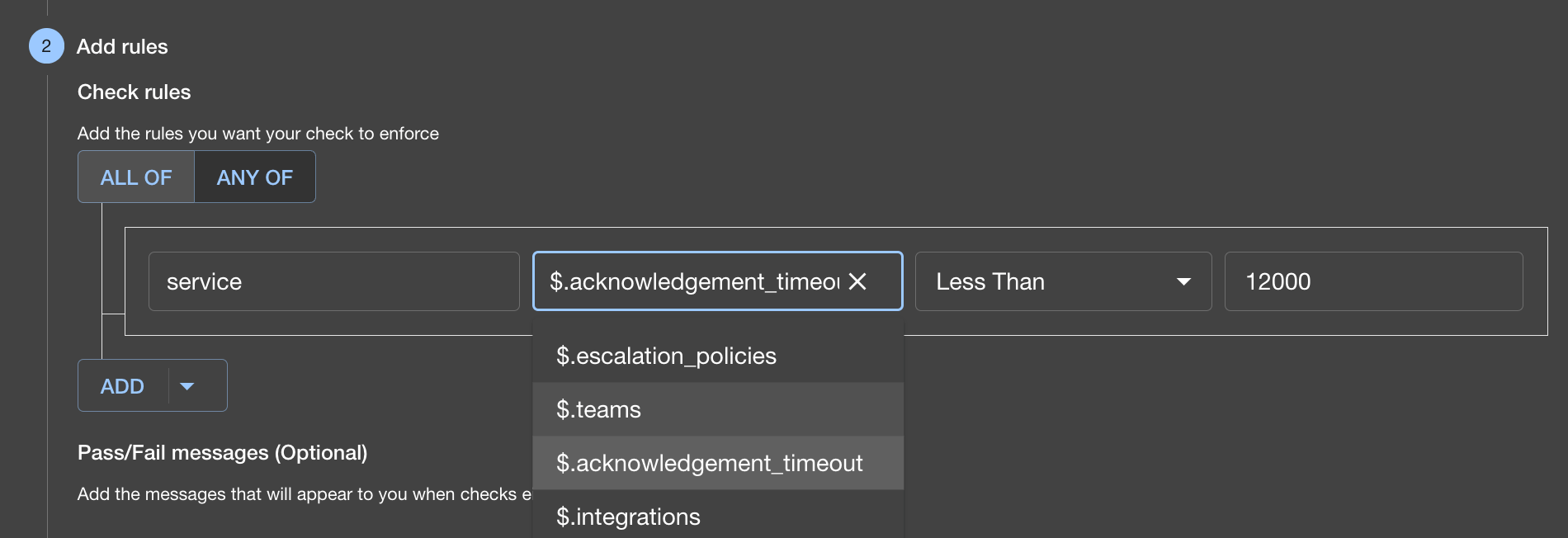
getDataSchema() | string | undefined | Returns a JSON schema describing the structure of a fact's data. Used by the NCUI to display available paths when creating checks |
getFactNames()
Returns an array of fact references your integration can collect. In this example, we only support one fact (SERVICE_FACT_REFERENCE), so we return a single-element array.
getDataSchema()
Returns a JSON schema that describes the shape of the data for a given fact. This enables the Soundcheck UI to show users which data paths are available when creating checks:

The schema doesn't need to include every field returned by the API. Any paths not in the schema simply won't appear in the UI autocomplete—but you can still use them in your checks.
The getCollectionConfigs method tells Soundcheck when and how to collect facts:
async getCollectionConfigs(): Promise<CollectionConfig[]> {
const collects = this.#config?.getConfigArray('collects');
if (!this.#config || !collects?.length) {
return [];
}
return collects.map((collect: Config) => ({
factRefs: [SERVICE_FACT_REFERENCE],
filter:
collect.getOptional('filter') ??
this.#config?.getOptional('filter'),
exclude:
collect.getOptional('exclude') ??
this.#config?.getOptional('exclude'),
frequency:
collect.getOptional('frequency') ??
this.#config?.getOptional('frequency'),
initialDelay:
collect.getOptional('initialDelay') ??
this.#config?.getOptional('initialDelay'),
batchSize:
collect.getOptional('batchSize') ??
this.#config?.getOptional('batchSize'),
cache:
collect.getOptional('cache') ??
this.#config?.getOptional('cache'),
}));
}
📖 Understanding CollectionConfig
The getCollectionConfigs method returns an array of CollectionConfig objects. Soundcheck uses this method to determine:
- How often to collect facts (frequency)
- What facts to collect (factRefs)
- For which entities to collect facts (filter/exclude)
Most integrations return a single CollectionConfig that applies to all facts, but you can return multiple configurations with different schedules or filters.
In the code above, defaults from the top-level configuration are applied to each collect configuration if not specified individually—this allows users to set common defaults while overriding specific settings per fact type.
The CollectionConfig type is defined in the @spotify/backstage-plugin-soundcheck-common package:
| Property | Type | Description |
|---|---|---|
factRefs | FactRef[] | The facts to which this collection configuration applies |
filter | EntityFilter | Filter specifying which entities to collect facts for. Matches the Catalog API filter format |
exclude | EntityFilter | Filter specifying which entities to exclude from collection |
frequency | { cron: string } or { minutes: number } or { hours: number } | How often to collect facts. If not provided, collection will not be scheduled |
initialDelay | { seconds: number } or { minutes: number } | Delay before first collection |
batchSize | number | Number of entities to process at once. Defaults to 1 |
cache | CacheConfig | Cache settings for collected facts. If not provided, facts will not be cached |
Example configurations:
# Every 5 minutes
frequency:
minutes: 5
# Daily at midnight
frequency:
cron: "0 0 * * *"
# Filter to production components
filter:
kind: Component
spec.lifecycle: production
# Exclude experimental components
exclude:
metadata.tags: ['experimental']
These methods are from the ConfigurableFactCollector interface and handle runtime configuration updates:
getConfig(): Promise<JsonValue | undefined> {
return Promise.resolve(this.#rawConfig);
}
getConfigSchema(): Promise<string> {
return Promise.resolve(JSON.stringify({
type: 'object',
properties: {
token: {
type: 'string',
title: 'PagerDuty API Token',
description: 'The API token for the PagerDuty API',
},
},
required: ['token'],
}));
}
setConfig(config: JsonValue): Promise<void> {
this.#rawConfig = config;
this.#config = new ConfigReader(config as JsonObject);
const token = this.#config.getOptionalString('token');
if (!token) {
this.#logger.warn('No token provided, facts cannot be collected.');
}
this.#pd = api({ token });
return Promise.resolve();
}
📖 Configuration Validation with Zod
For production integrations, validate configuration with Zod:
import { z } from 'zod';
const ExamplePagerDutyConfigSchema = z.object({
token: z.string().min(1, 'PagerDuty token is required'),
frequency: z.object({
minutes: z.number().optional(),
hours: z.number().optional(),
cron: z.string().optional(),
}).optional(),
filter: z.record(z.unknown()).optional(),
collects: z.array(z.object({
type: z.string(),
frequency: z.object({
minutes: z.number().optional(),
hours: z.number().optional(),
}).optional(),
filter: z.record(z.unknown()).optional(),
})).optional(),
});
// In setConfig():
setConfig(config: JsonValue): Promise<void> {
const result = ExamplePagerDutyConfigSchema.safeParse(config);
if (!result.success) {
throw new InputError(`Invalid configuration: ${result.error.message}`);
}
// ... rest of implementation
}
If you've followed tabs 1-6, you should now have this complete implementation. If not, you can copy and paste this entire snippet into src/ExamplePagerDutyFactCollector.ts:
import { Entity, stringifyEntityRef } from '@backstage/catalog-model';
import { api } from '@pagerduty/pdjs';
import {
CollectionConfig,
Fact,
FactRef,
stringifyFactRef,
} from '@spotify/backstage-plugin-soundcheck-common';
import { ConfigurableFactCollector } from '@spotify/backstage-plugin-soundcheck-node';
import { DateTime } from 'luxon';
import qs from 'qs';
import { JsonObject, JsonValue } from '@backstage/types';
import { Config, ConfigReader } from '@backstage/config';
import { PartialCall } from '@pagerduty/pdjs/build/src/api';
import { LoggerService } from '@backstage/backend-plugin-api';
const ID = 'example-pagerduty';
const SCOPE = 'default';
const SERVICE_FACT_REFERENCE = `${ID}:${SCOPE}/service`;
const SERVICE_DETAILS = [
'escalation_policies',
'teams',
'auto_pause_notifications_parameters',
'integrations',
];
export class ExamplePagerDutyFactCollector
implements ConfigurableFactCollector
{
id = ID;
name = 'Example PagerDuty Integration';
description = 'Collects service details from PagerDuty';
#rawConfig?: JsonValue;
#config?: Config;
#pd?: PartialCall;
readonly #logger: LoggerService;
private constructor(logger: LoggerService) {
this.#logger = logger.child({ target: this.id });
}
public static create(logger: LoggerService): ExamplePagerDutyFactCollector {
return new ExamplePagerDutyFactCollector(logger);
}
async collect(
entities: Entity[],
params?: { factRefs?: FactRef[]; refresh?: FactRef[] },
): Promise<Fact[]> {
const facts: Fact[] = [];
if (params?.factRefs) {
const requested = params.factRefs.map(ref => stringifyFactRef(ref));
if (!requested.includes(SERVICE_FACT_REFERENCE)) {
this.#logger.warn('Unsupported factRefs requested');
return [];
}
}
if (params?.refresh) {
this.#logger.warn('Refresh is not supported for this collector');
}
for (const entity of entities) {
const fact = await this.#collectServiceFact(entity);
if (fact) {
facts.push(fact);
}
}
return facts;
}
async #collectServiceFact(entity: Entity): Promise<Fact | undefined> {
const serviceId = entity.metadata.annotations?.['pagerduty.com/service-id'];
if (!serviceId) return undefined;
const service = await this.#getService(serviceId, SERVICE_DETAILS);
if (!service) return undefined;
return {
factRef: SERVICE_FACT_REFERENCE,
entityRef: stringifyEntityRef(entity),
data: service,
timestamp: DateTime.utc().toISO()!,
};
}
async #getService(serviceId: string, include?: string[]): Promise<any> {
if (!this.#pd) return undefined;
const query = qs.stringify(
{ 'include[]': include },
{ indices: false },
);
const { data } = await this.#pd.get(`/services/${serviceId}?${query}`);
return data?.service;
}
async getFactNames(): Promise<string[]> {
return [SERVICE_FACT_REFERENCE];
}
async getDataSchema(factName: FactRef): Promise<string | undefined> {
if (factName === SERVICE_FACT_REFERENCE.split('/')[1]) {
return JSON.stringify({
title: 'Service Details',
description: 'PagerDuty Service Details',
type: 'object',
properties: {
id: { type: 'string' },
name: { type: 'string' },
description: { type: 'string' },
status: { type: 'string' },
escalation_policies: { type: 'object' },
teams: { type: 'array' },
acknowledgement_timeout: { type: 'number' },
integrations: { type: 'object' },
},
});
}
return undefined;
}
async getCollectionConfigs(): Promise<CollectionConfig[]> {
const collects = this.#config?.getConfigArray('collects');
if (!this.#config || !collects?.length) {
return [];
}
return collects.map((collect: Config) => ({
factRefs: [SERVICE_FACT_REFERENCE],
filter:
collect.getOptional('filter') ??
this.#config?.getOptional('filter'),
exclude:
collect.getOptional('exclude') ??
this.#config?.getOptional('exclude'),
frequency:
collect.getOptional('frequency') ??
this.#config?.getOptional('frequency'),
initialDelay:
collect.getOptional('initialDelay') ??
this.#config?.getOptional('initialDelay'),
batchSize:
collect.getOptional('batchSize') ??
this.#config?.getOptional('batchSize'),
cache:
collect.getOptional('cache') ??
this.#config?.getOptional('cache'),
}));
}
getConfig(): Promise<JsonValue | undefined> {
return Promise.resolve(this.#rawConfig);
}
getConfigSchema(): Promise<string> {
return Promise.resolve(JSON.stringify({
type: 'object',
properties: {
token: {
type: 'string',
title: 'PagerDuty API Token',
description: 'The API token for the PagerDuty API',
},
},
required: ['token'],
}));
}
setConfig(config: JsonValue): Promise<void> {
this.#rawConfig = config;
this.#config = new ConfigReader(config as JsonObject);
const token = this.#config.getOptionalString('token');
if (!token) {
this.#logger.warn('No token provided, facts cannot be collected.');
}
this.#pd = api({ token });
return Promise.resolve();
}
}
Step 3: Register the Module
Update the module.ts file in your backend module to register the fact collector:
import {
createBackendModule,
coreServices,
} from '@backstage/backend-plugin-api';
import { factCollectionExtensionPoint } from '@spotify/backstage-plugin-soundcheck-node';
import { ExamplePagerDutyFactCollector } from './ExamplePagerDutyFactCollector';
export const soundcheckModuleExamplePagerduty = createBackendModule({
pluginId: 'soundcheck',
moduleId: 'example-pagerduty',
register(env) {
env.registerInit({
deps: {
logger: coreServices.logger,
collectorsExtension: factCollectionExtensionPoint,
},
async init({ logger, collectorsExtension }) {
collectorsExtension.addFactCollector(
ExamplePagerDutyFactCollector.create(logger),
);
},
});
},
});
This code creates a Backstage backend module that extends the Soundcheck plugin. When registered:
- The module declares a dependency on
factCollectionExtensionPoint—an extension point exposed by Soundcheck that allows external modules to register custom fact collectors. - During initialization, it calls
addFactCollector()to register ourExamplePagerDutyFactCollectorwith Soundcheck's fact collection system. - Once registered, Soundcheck manages the collector's lifecycle, including scheduling fact collection based on the
frequencyyou define inapp-config.yaml.
Step 4: Configure Your Integration
4.1 Add the collector configuration
Add the following to your app-config.yaml:
soundcheck:
collectors:
example-pagerduty:
token: ${PAGERDUTY_TOKEN} # Your PagerDuty API token
# Default settings for all collect configurations
frequency:
minutes: 5
initialDelay:
seconds: 15
filter:
kind: Component
spec.lifecycle: production
# What facts to collect
collects:
- type: Service
📖 Advanced: Multiple collection schedules
You can define multiple collection schedules with different filters and frequencies:
soundcheck:
collectors:
example-pagerduty:
token: ${PAGERDUTY_TOKEN}
frequency:
minutes: 5
filter:
kind: Component
spec.lifecycle: production
collects:
# Collect every 5 minutes (uses defaults above)
- type: Service
# Collect every 30 minutes for specific tags
- type: Service
frequency:
minutes: 30
filter:
kind: Component
metadata.tags: ['critical-service']
4.2 Annotate your entities
Add the PagerDuty service annotation to entities that should be tracked:
apiVersion: backstage.io/v1alpha1
kind: Component
metadata:
name: my-service
annotations:
pagerduty.com/service-id: PXXXXXX # Your PagerDuty service ID
spec:
type: service
lifecycle: production
owner: team-a
Step 5: Create Checks and Tracks
Add checks and tracks to your app-config.yaml under the same soundcheck: key you configured in Step 4.
5.1 Define a check
Add a checks section to use the collected facts:
soundcheck:
# ... collectors config from Step 4 ...
checks:
- id: requires_service_status_to_be_active
description: Requires PagerDuty service status to be active
passedMessage: ✅ Service is active
failedMessage: ❌ Service is not active
rule:
factRef: example-pagerduty:default/service
path: $.status
operator: equal
value: active
Notice this check has no schedule property. This is intentional—Soundcheck automatically triggers any check when the facts it depends on are collected.
Since this check references example-pagerduty:default/service in its factRef, it will run automatically whenever our ExamplePagerDutyFactCollector collects the service fact. The collector runs on the schedule we defined in Step 4 (e.g., every 5 minutes), so the check runs on that same cadence.
This is the recommended approach: schedule fact collection, not checks. It ensures checks always evaluate fresh data and respects the rate-limiting settings configured for the collector.
5.2 Create a track
Add a tracks section to group your checks:
soundcheck:
# ... collectors and checks config from above ...
tracks:
- id: pagerduty_track
name: PagerDuty
ownerEntityRef: group:default/platform-team # Update with your team
description: >
Ensure components are properly configured for incident management.
filter:
catalog:
spec.lifecycle: 'production'
levels:
- ordinal: 1
name: Incident Readiness
description: Basic PagerDuty integration checks
checks:
- id: requires_service_status_to_be_active
name: Service Status Active
description: Verifies the PagerDuty service is active
Step 6: Verify Your Integration
- Start your Backstage instance
- Navigate to Soundcheck → Integrations
- Confirm your custom integration appears in the list
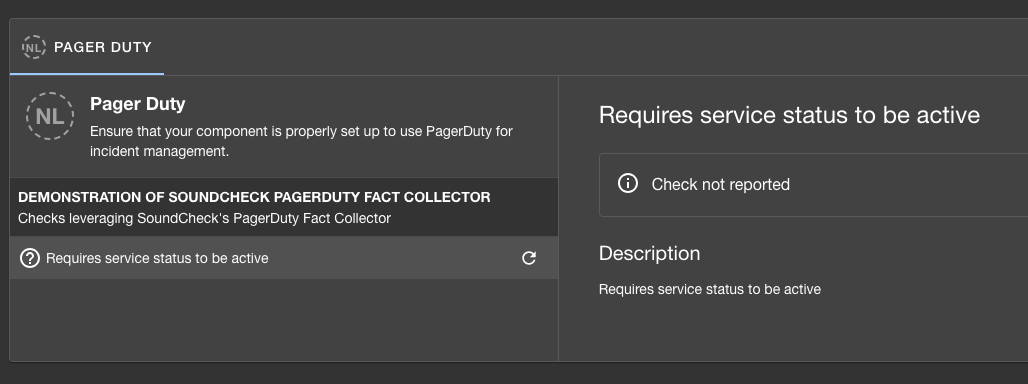
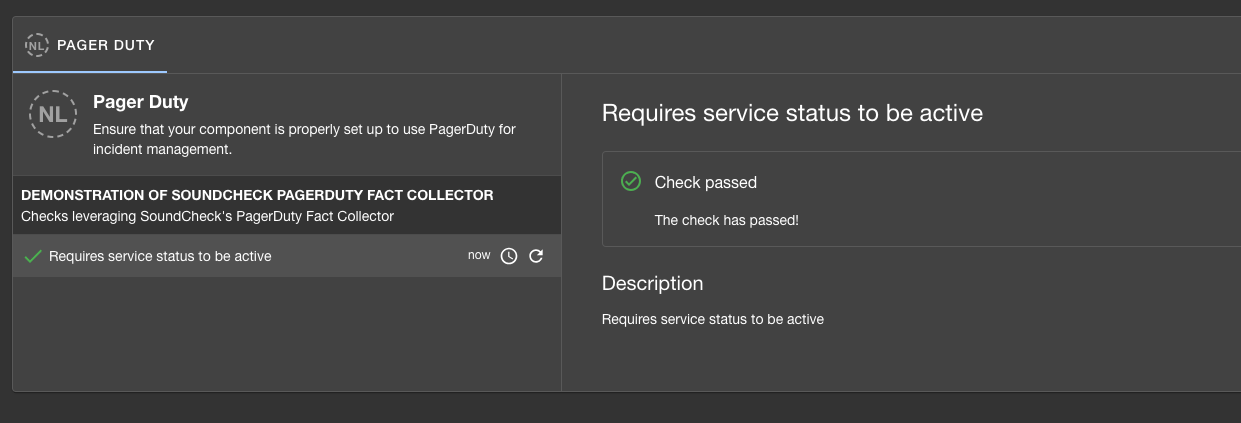
Once the collector runs (based on your configured frequency), you'll see the checks execute:

After facts are collected, the track shows pass/fail status for your entities:

🎉 Congratulations! Your custom PagerDuty integration is now running.
Next Steps
- Create a No-Code UI for your integration to enable configuration through the Soundcheck interface