

Prerequisites
- At least two fact collectors configured and producing data (e.g., Catalog + PagerDuty, or SonarQube + GitHub)
- Permission to create or edit checks in Soundcheck
Step-by-step guide
1. Create a new check (or edit an existing one)
Navigate to Soundcheck → Checks and click Create Check, or open an existing check and click Edit.2. Configure the primary fact
In the Rule section, configure the left-hand side of the comparison:- Fact: Select the primary fact source and fact name. For example, select the
pagerdutyintegration and theincidentsfact. - Path: Enter the JSONPath to extract the value you want to compare. For example,
$.totalto get the total incident count.
3. Choose an operator
Select the comparison operator from the dropdown. Common operators for multi-fact checks include:4. Switch to fact-reference mode
Instead of typing a literal value in the Value field, click the Fact button next to the value input. This opens the Fact Explorer dialog, which lets you select a second fact as the comparison value.
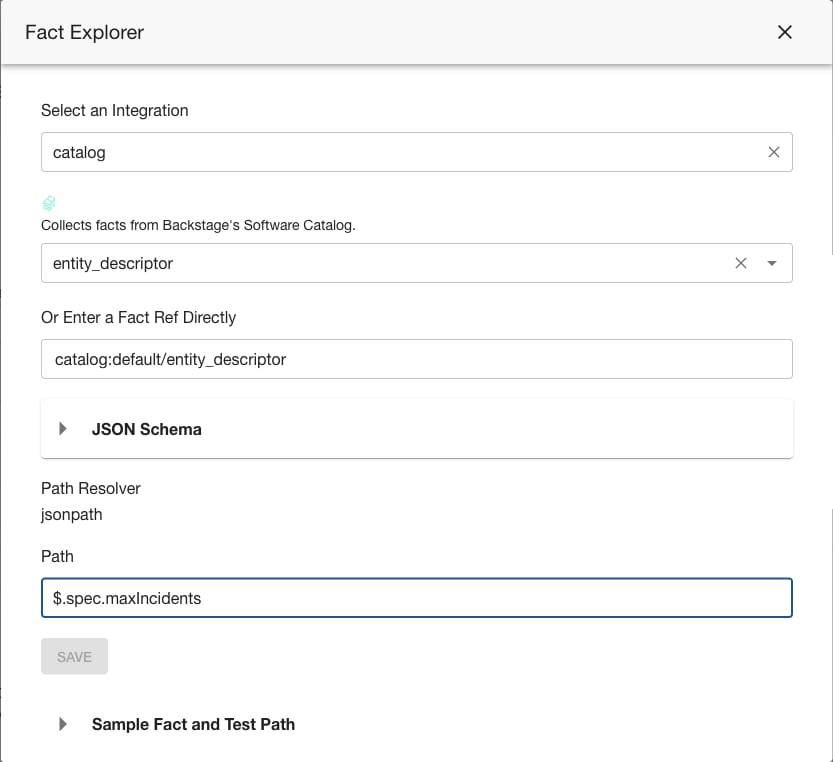
5. Select the comparison fact
In the Fact Explorer dialog:- Select an integration — Choose the collector that produces the comparison data (e.g.,
catalog) - Select a fact — Pick the specific fact (e.g.,
entity_descriptor) - Enter the path — Provide the JSONPath to extract the comparison value (e.g.,
$.spec.maxIncidents) - Save — Click Save to set the fact reference as the comparison value
6. Save the check
Click Save to create or update the check. Soundcheck will now evaluate this rule by:- Collecting the primary fact for each applicable entity
- Collecting the comparison fact for each applicable entity
- Extracting the values at the specified paths
- Comparing them using the selected operator
Example: SonarQube coverage vs catalog-defined threshold
This check compares SonarQube code coverage against a minimum threshold defined in the entity’s catalog metadata.
What it checks: “Is SonarQube code coverage greater than the minimum defined in the entity’s
soundcheck.spotify.com/min-coverage annotation?”
Equivalent YAML
Example: PagerDuty standards passing count vs catalog-defined minimum
This check verifies that the number of passing PagerDuty service standards meets a minimum defined in the entity’s catalog metadata.
What it checks: “Is the number of passing PagerDuty standards at least the minimum defined in the entity’s
soundcheck.spotify.com/min-standards annotation?”
Equivalent YAML
Tips
- Both facts must be collected for the entities the check applies to. If either fact is missing for an entity, the check result will be “not reported” for that entity.
- Fact paths must resolve to comparable values — typically numbers for numeric operators (
lessThan,greaterThan) or strings for equality operators (equal). - You can mix literal and fact-reference values across different conditions in the same check. For example, one condition can compare against a literal threshold while another compares against a dynamic fact value.
- The Fact Explorer shows available facts based on your configured collectors. If you don’t see the fact you need, verify that the corresponding collector is configured and has collected data.