

Overview
DevEx Metrics helps you understand developer productivity at your organization. The plugin, displayed as a tab within the Insights plugin, automatically collects and ingests important data points covering the developer lifecycle (pull requests, CI/CD executions, incidents, and more) and aggregates them into metrics that are displayed in intuitive visualizations and dashboards. On the main page, you’ll get a snapshot of all metrics, grouped into categories like “DORA Metrics” and “AI Usage Metrics.” Each metric snapshot shows comparisons to previous periods as well as one or more supporting metrics for additional context.

Even though DevEx Metrics is shown within the Insights plugin, all data is
stored within your Portal instance and is covered by all of the same data
security and data privacy controls in place for the rest of the data available
in your Portal instance.
Getting started
No action is necessary to get started! Core metrics that can be derived from systems for which you’ve already granted Portal access (e.g. SCM providers like GitHub, GitLab, or Azure DevOps) are available as soon as initial data loads are complete. Default metric calculations are based on input from developer productivity experts at Spotify and are designed to have the widest relevance within organizations.Configuring sources
While many core metrics are automatically derived from data already available to Portal, you can unlock additional metrics by configuring credentials for relevant source systems. To add credentials for a source, click the ”?” icon to open the “Learn More” drawer for a given metric. There, you’ll see a list of Data Sources that can be used to power that metric, as well as a configuration status. Click the “Manage Integration” icon to add credentials in Portal’s integration settings.
Supported sources
| Type | Source | Details |
|---|---|---|
| Source Code Management | GitHub | Deployment frequency, lead time for change, and supporting metrics can be tracked via repositories, pull requests, and workflow runs; these are automatically ingested based on credentials you’ve already configured in Portal. CI metrics derived from GitHub Actions are currently in beta. |
| GitLab | Deployment frequency, lead time for change, and supporting metrics can be tracked via repositories, merge requests, and pipelines; these are automatically ingested based on credentials you’ve already configured in Portal. | |
| Azure DevOps | Deployment frequency, lead time for change, and supporting metrics can be tracked via repositories, pull requests, and workflow runs; these are automatically ingested based on credentials you’ve already configured in Portal. | |
| AI | GitHub Copilot | Copilot usage and billing data can be ingested to track key AI Usage metrics. Follow the guide above to configure this source. |
| Cursor | Cursor data can be used to track key AI usage metrics. Grab an Admin API key and follow the guide above to configure this source. | |
| Claude | Claude data can be used to track key AI usage metrics. Grab anEnterprise Analytics API keywith the read:analytics scope and follow the guide above to
configure this source. | |
| Incident Management | PagerDuty | Time to Recovery and supporting metrics can be tracked via incidents and services; learn more aboutusing PagerDuty in Portal, then follow the guide above to configure this source. |
Configuring metric calculations
Most metrics are built on common assumptions about how organizations use tools, however some metrics require additional configuration for accuracy. Like data sources, metric configurations can be configured from a metric’s “Learn More” drawer: in the section outlining how the metric is calculated, an “Edit” icon will appear. Clicking the icon will expose a form specific to the metric.
Measurement strategies
Many metrics support custom measurement strategies. A measurement strategy controls the underlying data or methodology used to calculate a metric — for example, whether Deployment Frequency counts merged pull or merge requests or matched CI/CD runs. To choose a strategy, open the metric’s Learn More drawer and select Edit Calculation. The available strategies fall into a few common groups. Availability depends on the integrations configured for your organization; see the supported sources above for provider-specific details.
Deployment Frequency strategies are configured separately for each SCM provider, so you can tailor what counts as a deployment to each provider’s tooling.

Workflow filters
When you select a workflow-based measurement strategy for Deployment Frequency, you can add workflow filters to control which workflow runs are included in the metric calculation. Each filter can be set to include or exclude matching runs, and multiple filters can be combined. All text fields accept POSIX regular expressions, so a single filter can match an arbitrary number of workflows. Filters support multiple fields — for example, workflow name, branch, and conclusion — so you can express rules like “include all workflows whose name matches^deploy-.* on the main branch” or “exclude all runs with a failure conclusion.” Workflow filters only apply when a workflow-based strategy is selected.

Metrics that require configuration
The following metrics require configuration for accuracy: AI Cost Per Engaged User While variable costs are calculated based on data provided by each vendor, this metric also requires fixed license costs for each vendor. Engineering Time Saved Time savings is calculated based on Software Template executions; a per-template time savings estimation is required to calculate total time savings.Data segmentation
Segmentation lets you break down any metric by a property to understand what’s behind the numbers and where to focus. It is available on the dashboard view of every metric group. You can segment by two properties:Team
Breaks down metric values by the teams defined in your Software Catalog. Use this to compare how different teams contribute to an overall metric and identify where to focus improvement efforts. Teams are resolved from ownership relationships in your catalog entities. If an entity belongs to multiple teams, its contribution is reflected in each relevant segment.Soundcheck track
Breaks down metric values by your Soundcheck tracks — the standards your organization has defined for software health and compliance. Use this to view your DevEx data from the perspective of standards adoption and understand how entities that meet or don’t meet specific tracks contribute to your metrics.Values are weighted proportionally based on how each data source’s entities
are distributed across segments. Totals across segments may not match the
unsegmented value because each data source’s contribution is split across the
relevant segments. Use the diagnose panel to see exactly how
attribution is calculated for your current view.
Metric overlays
Overlays add a second, dashed line to a timeseries chart so you can read a metric in context. Use the overlay control next to the segmentation selector on any metric’s detail view. By default, charts overlay the previous period — the window of equal length immediately before your selected date range — on the same axis, so you can see how the current period compares. You can also overlay another metric, chosen from a menu grouped by category and dashboard. It’s plotted against a secondary axis on the right in its own units, so you can spot relationships such as a rise in change request size lining up with a longer lead time for change. Overlays follow your current date range and segmentation. Only timeseries metrics can be overlaid; metrics that aren’t eligible appear disabled in the menu with an explanation on hover.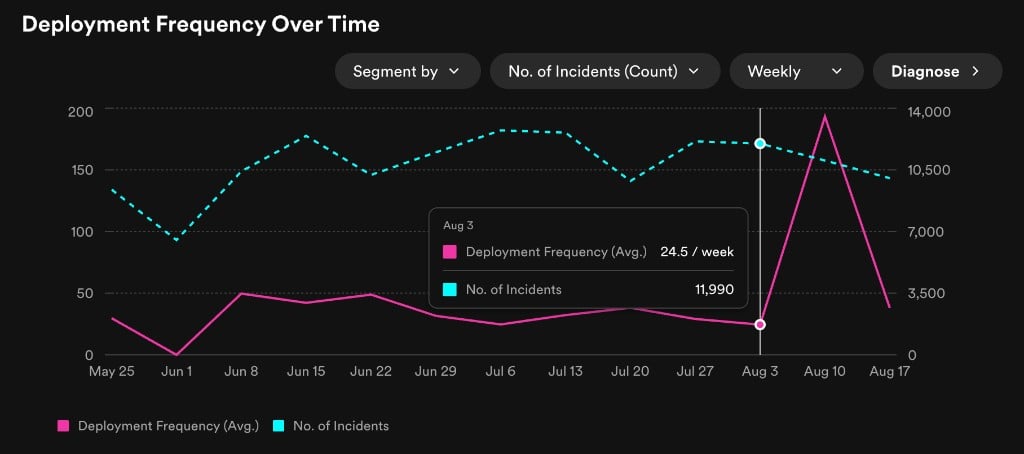
Diagnose
The diagnose panel helps you understand the results shown in your dashboard, especially when filters or segmentation produce unexpected numbers or gaps in data. It is available on every metric group alongside the segment controls. The panel surfaces four categories of information:Example findings
No data imported yet — A configured data source has not completed its first import. Check that the integration is set up and the data import has run at least once. No segments have data — None of the entities matched any segments in the selected time range. Verify that your catalog entities have the expected team ownership or Soundcheck track associations.Metric calculation changes
2026/08/25
All of the changes on this date apply to the entire data history of the relevant metrics. Some of the headline values were correct global aggregates but not consistent with the detailed view charts. The changes address this issue, by modifying the inconsistent headlines to be a Mean of weekly P75 values. Metrics changed:- Deployment Frequency
- Lead Time For Change
- Time To Recovery
- Pre-Merge Queue Time
- Pre-Merge CI Feedback Time