> ## Documentation Index
> Fetch the complete documentation index at: https://backstage.spotify.com/docs/llms.txt
> Use this file to discover all available pages before exploring further.
# GitHub Integration Troubleshooting
> Resolve GitHub App and Personal Access Token integration issues in Portal, including permissions, repository access, and authentication errors.
This guide covers common issues and solutions for GitHub integration with
Spotify Portal for Backstage, including both GitHub App and Personal Access
Token (PAT) authentication methods.
## GitHub App Issues
### Installing and Configuring GitHub App
If you're setting up a GitHub App for the first time or need to reinstall it:
1. Ensure you have admin access to your GitHub organization
2. Follow the GitHub App setup process in the [Getting Started guide](../guides/auth/github).
3. Verify you've selected all the required organizations during installation
4. Confirm the app is installed on all repositories you want to access in Portal
 ### Managing GitHub App Permissions
If you're experiencing permission-related issues with your GitHub App:
1. Check that your GitHub App has all the [required permissions](../guides/auth/github/setup-auth#repository-permissions) for repository access
2. Verify the organization permissions are set correctly to [read members](../guides/auth/github/setup-auth#organization-permissions)
3. If permissions were recently updated, you may need to reinstall the app for changes to take effect
### Managing GitHub App Permissions
If you're experiencing permission-related issues with your GitHub App:
1. Check that your GitHub App has all the [required permissions](../guides/auth/github/setup-auth#repository-permissions) for repository access
2. Verify the organization permissions are set correctly to [read members](../guides/auth/github/setup-auth#organization-permissions)
3. If permissions were recently updated, you may need to reinstall the app for changes to take effect
 ### Expired Client Secret or Private Key
GitHub App credentials may need to be regenerated periodically for security reasons. If you're experiencing authentication issues:
1. Visit your GitHub App settings page in your organization
2. Check if your Client Secret or Private Key needs to be regenerated
3. For Client Secret: Click "Generate a new client secret"
4. For Private Key: Click "Generate a private key"
5. Update the corresponding credentials in Portal's App Settings
### Expired Client Secret or Private Key
GitHub App credentials may need to be regenerated periodically for security reasons. If you're experiencing authentication issues:
1. Visit your GitHub App settings page in your organization
2. Check if your Client Secret or Private Key needs to be regenerated
3. For Client Secret: Click "Generate a new client secret"
4. For Private Key: Click "Generate a private key"
5. Update the corresponding credentials in Portal's App Settings

 ## Personal Access Token (PAT) Issues
### Replacing GitHub expired personal access token
When your GitHub personal access token expires, you'll need to generate a new one and update it in Portal. Follow these steps:
1. Visit your [GitHub Personal Access Tokens settings](https://github.com/settings/tokens)
2. Find your expired token in the list
3. Click "Regenerate token" to create a new token with the same permissions
## Personal Access Token (PAT) Issues
### Replacing GitHub expired personal access token
When your GitHub personal access token expires, you'll need to generate a new one and update it in Portal. Follow these steps:
1. Visit your [GitHub Personal Access Tokens settings](https://github.com/settings/tokens)
2. Find your expired token in the list
3. Click "Regenerate token" to create a new token with the same permissions
 After regenerating your token:
1. Set an appropriate expiration date for your security needs
2. Click "Regenerate token" to confirm
3. Copy your new token immediately (GitHub will only show it once)
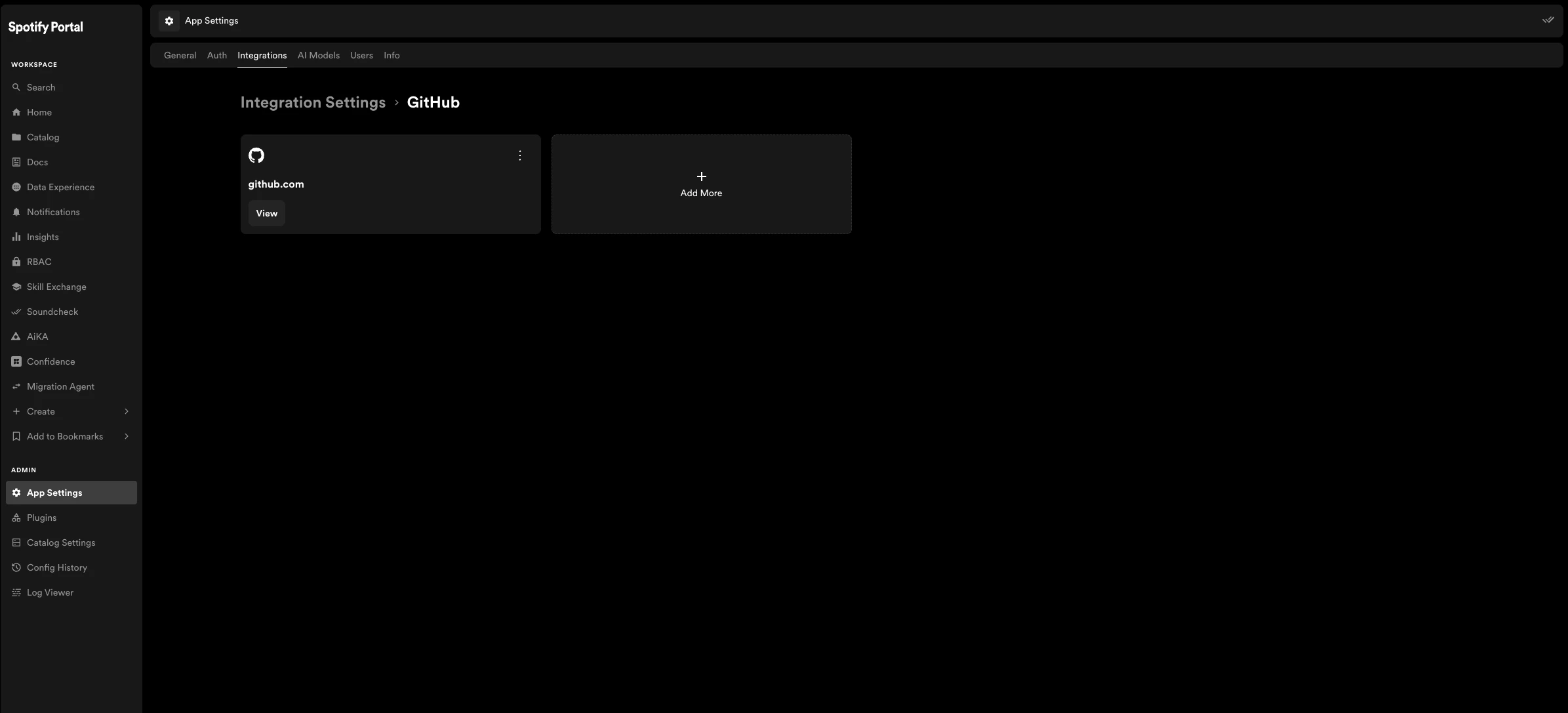
4. In Spotify Portal, navigate to App Settings at `/admin/app-settings/integrations/github`
5. Paste your new token in the "token" field
6. Click "Save Changes" to update your GitHub integration
After regenerating your token:
1. Set an appropriate expiration date for your security needs
2. Click "Regenerate token" to confirm
3. Copy your new token immediately (GitHub will only show it once)
4. In Spotify Portal, navigate to App Settings at `/admin/app-settings/integrations/github`
5. Paste your new token in the "token" field
6. Click "Save Changes" to update your GitHub integration
 ### Insufficient PAT Permissions
If you're experiencing permission issues with your GitHub PAT:
1. Verify your PAT has all the required scopes as outlined in the [GitHub Setup Guide](../guides/auth/github/setup-auth)
2. Check if your PAT has expired and needs to be regenerated
3. Ensure the GitHub user associated with the PAT has appropriate access to the repositories
## Organization Access Issues
### Missing Teams or Organizations
If you can't see certain GitHub teams or organizations in Portal:
1. Verify the GitHub App is installed on those organizations or your PAT has access to them
2. Check that the organizations are included in your Portal configuration
3. Ensure the GitHub App or PAT has the necessary permissions to read organization data
4. Try refreshing the catalog to trigger a new sync with GitHub
### Rate Limiting
If you're experiencing rate limiting issues with GitHub API:
1. Consider switching from PAT to GitHub App authentication (which has higher rate limits)
2. Optimize your catalog refresh intervals to reduce API calls
3. See the [Rate Limiting](./rate-limiting) guide for more detailed solutions
## Migrating from PAT to GitHub App
For improved security and higher rate limits, we recommend migrating from Personal Access Tokens to GitHub Apps.
You can find more information about GitHub Apps in the [Getting Started guide](../guides/auth/github).
### Insufficient PAT Permissions
If you're experiencing permission issues with your GitHub PAT:
1. Verify your PAT has all the required scopes as outlined in the [GitHub Setup Guide](../guides/auth/github/setup-auth)
2. Check if your PAT has expired and needs to be regenerated
3. Ensure the GitHub user associated with the PAT has appropriate access to the repositories
## Organization Access Issues
### Missing Teams or Organizations
If you can't see certain GitHub teams or organizations in Portal:
1. Verify the GitHub App is installed on those organizations or your PAT has access to them
2. Check that the organizations are included in your Portal configuration
3. Ensure the GitHub App or PAT has the necessary permissions to read organization data
4. Try refreshing the catalog to trigger a new sync with GitHub
### Rate Limiting
If you're experiencing rate limiting issues with GitHub API:
1. Consider switching from PAT to GitHub App authentication (which has higher rate limits)
2. Optimize your catalog refresh intervals to reduce API calls
3. See the [Rate Limiting](./rate-limiting) guide for more detailed solutions
## Migrating from PAT to GitHub App
For improved security and higher rate limits, we recommend migrating from Personal Access Tokens to GitHub Apps.
You can find more information about GitHub Apps in the [Getting Started guide](../guides/auth/github).