> ## Documentation Index
> Fetch the complete documentation index at: https://backstage.spotify.com/docs/llms.txt
> Use this file to discover all available pages before exploring further.
# Fleetshift: Getting Started
> Set up webhooks for GitHub or Azure DevOps and configure permissions so your Portal instance is ready for Fleetshift.
This page is for **Portal admins**. The setup steps below require admin access
to your Portal instance and your SCM provider.
Fleetshift automates large-scale code changes across your repositories through both
**agentic** and **deterministic** workflows. You can describe the change you want in
natural language for an AI agent to implement, or execute predefined, repeatable
transformations for deterministic use cases. Fleetshift applies the changes across your
target repositories and opens pull requests for your team to review, making large-scale
migrations safe, consistent, and easy to manage.
This page covers the base setup that all Fleetshift features depend on. Once complete,
continue to [Enable AI Shifts](/docs/portal/core-features-and-plugins/fleetshift/enable-ai-shifts)
to connect an AI provider. You can also run deterministic shifts through
[OpenRewrite Shifts](/docs/portal/core-features-and-plugins/fleetshift/openrewrite-shifts) or
[npm package Shifts](/docs/portal/core-features-and-plugins/fleetshift/npm-package-shifts).
## Supported features
### SCM providers
| Provider | Status |
| ------------ | ----------- |
| GitHub | Supported |
| Azure DevOps | Supported |
| GitLab | Coming soon |
### AI providers and models
| Provider | Supported models |
| ---------------- | ----------------------------------- |
| Amazon Bedrock | Claude Opus, Claude Sonnet |
| Google Vertex AI | Claude Opus, Claude Sonnet |
| OpenAI | GPT-5.5, GPT-5, GPT-4.1, and others |
### Coming soon
| Feature | Description |
| ---------------------- | -------------------------------------------------------------- |
| Monorepo support | Run shifts that target specific packages within a monorepo. |
| GitLab | Use GitLab as an SCM provider for Fleetshift. |
| AWS hosted instances | Run Fleetshift agent workloads on AWS hosted infrastructure. |
| Azure hosted instances | Run Fleetshift agent workloads on Azure hosted infrastructure. |
| Gemini AI Studio | Use Google Gemini models as an AI provider for Fleetshift. |
## Prerequisites
* A Portal instance with the Fleetshift feature enabled
* Admin access to your GitHub organization or Azure DevOps project, or the repositories you want to target
* Permission to update Portal plugin settings
## Connect events
Fleetshift relies on webhooks so Portal can track pull request and push activity
after agent jobs run. Set this up before your team starts running shifts.
Choose your SCM provider below and follow the steps.
We recommend org-level webhooks because new repositories are automatically covered. If
your organization does not allow org-level webhooks, you can create the same webhook on
each repository that Fleetshift will target.
### Create the GitHub webhook
1. In GitHub, open your organization settings.
2. Go to `Settings > Webhooks > Add webhook`.
3. Fill in the webhook form:
| Field | Value |
| -------------- | ---------------------------------------------------------------------- |
| Payload URL | `https://.spotifyportal.com/api/events/http/github` |
| Content type | `application/json` |
| Secret | A generated webhook secret that you keep handy for the next step. |
| SSL validation | Enabled. |
| Events | `Pull requests`, `Pushes`, and `Issue comments`. |
| Active | Enabled. |
Replace `` with your Portal subdomain.
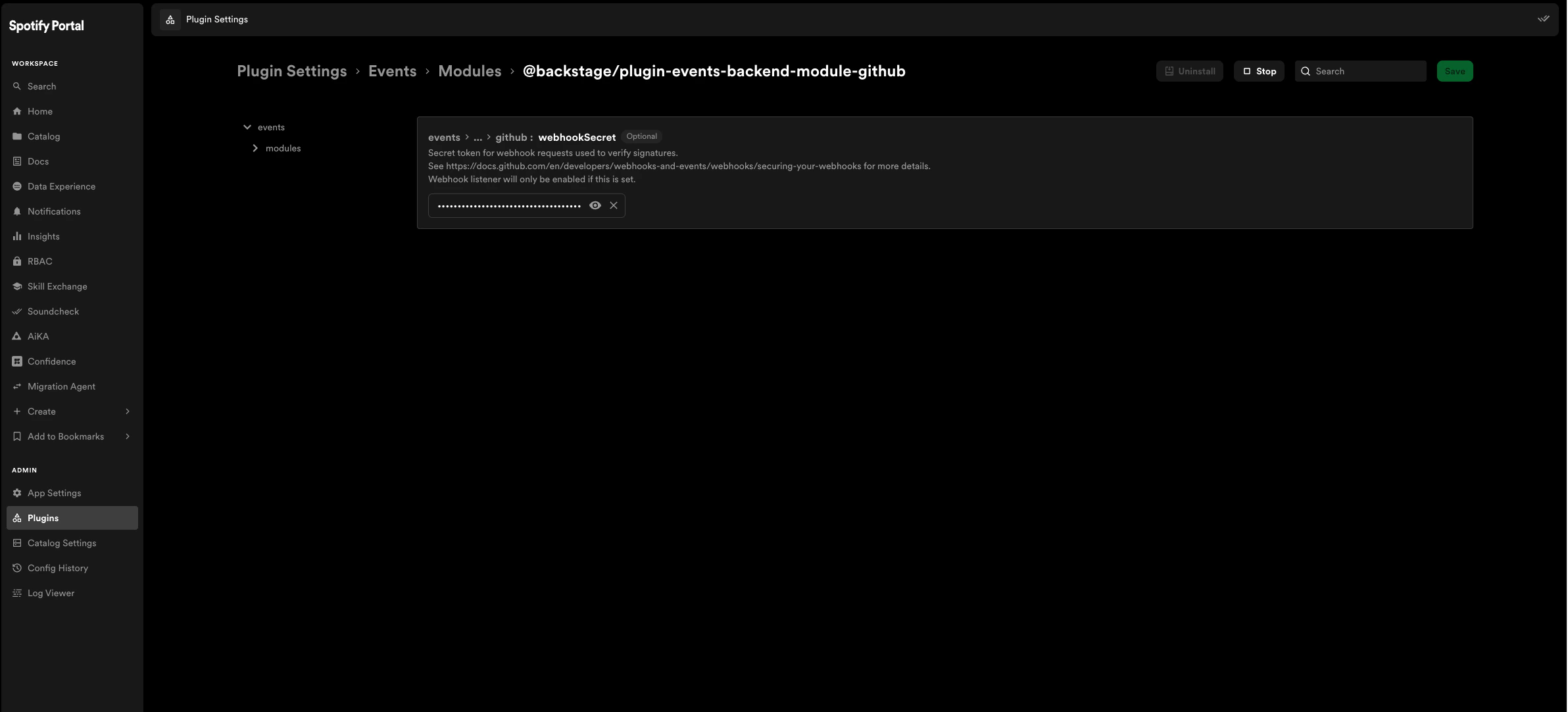
### Add the webhook secret to Portal
1. In Portal, go to `Plugin Settings > Events Plugin`.
2. Paste the same webhook secret into the `github:webhookSecret` field.
3. Save the configuration.
4. Start the GitHub events module and events plugin if they are not already running.
 Azure DevOps uses service hooks to send events to Portal. You need a
separate subscription for each event type, and each subscription follows the
same steps.
### Create the Azure DevOps service hooks
For each event type in the table below, create a subscription in Azure DevOps:
1. Go to **Project Settings** > **Service hooks** > **+ Create subscription**.
2. Select **Web Hooks** as the service, then click **Next**.
3. Choose the event trigger from the tables below, then click **Next**.
4. Fill in the webhook action settings from the table below and click **Finish**.
5. Repeat for each remaining event type.
#### Event types
| Event type | Description |
| -------------------------------- | --------------------------------------------------- |
| **Pull request created** | Fires when a new pull request is opened |
| **Pull request updated** | Fires when a PR is updated, abandoned, or completed |
| **Pull request merge attempted** | Fires when a PR merge completes |
| **Build completed** | Fires when a pipeline build finishes |
#### Webhook action settings
| Field | Value |
| ----------------------------- | --------------------------------------------------------------------------- |
| **URL** | `https://.spotifyportal.com/api/events/http/azureDevOps` |
| **HTTP headers** | `x-ado-webhook-secret:` |
| **Resource details to send** | All |
| **Messages to send** | All |
| **Detailed messages to send** | All |
Replace `` with your Portal subdomain and
`` with a generated secret. Use the same secret for
every service hook subscription.
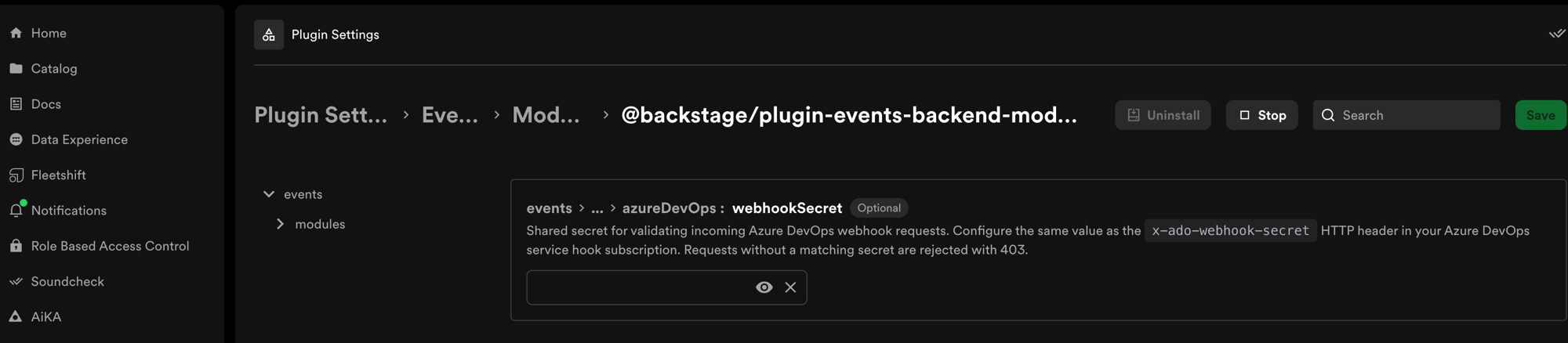
### Add the webhook secret to Portal
1. In Portal, go to `Plugin Settings > Events Plugin`.
2. Under `modules > @backstage/plugin-events-backend-module-azure`, paste
the same webhook secret into the `webhookSecret` field.
3. Save the configuration.
Azure DevOps uses service hooks to send events to Portal. You need a
separate subscription for each event type, and each subscription follows the
same steps.
### Create the Azure DevOps service hooks
For each event type in the table below, create a subscription in Azure DevOps:
1. Go to **Project Settings** > **Service hooks** > **+ Create subscription**.
2. Select **Web Hooks** as the service, then click **Next**.
3. Choose the event trigger from the tables below, then click **Next**.
4. Fill in the webhook action settings from the table below and click **Finish**.
5. Repeat for each remaining event type.
#### Event types
| Event type | Description |
| -------------------------------- | --------------------------------------------------- |
| **Pull request created** | Fires when a new pull request is opened |
| **Pull request updated** | Fires when a PR is updated, abandoned, or completed |
| **Pull request merge attempted** | Fires when a PR merge completes |
| **Build completed** | Fires when a pipeline build finishes |
#### Webhook action settings
| Field | Value |
| ----------------------------- | --------------------------------------------------------------------------- |
| **URL** | `https://.spotifyportal.com/api/events/http/azureDevOps` |
| **HTTP headers** | `x-ado-webhook-secret:` |
| **Resource details to send** | All |
| **Messages to send** | All |
| **Detailed messages to send** | All |
Replace `` with your Portal subdomain and
`` with a generated secret. Use the same secret for
every service hook subscription.
### Add the webhook secret to Portal
1. In Portal, go to `Plugin Settings > Events Plugin`.
2. Under `modules > @backstage/plugin-events-backend-module-azure`, paste
the same webhook secret into the `webhookSecret` field.
3. Save the configuration.
 ## Configure permissions (optional)
Fleetshift includes four permissions that you can assign to roles through your RBAC
policy. If you want to control who can create, edit, and run shifts, assign these
permissions to the appropriate roles.
| Permission | Description |
| -------------------------- | ----------------------------------- |
| `fleetshift.shift.create` | Create new shift definitions. |
| `fleetshift.shift.update` | Edit existing shift configurations. |
| `fleetshift.shift.delete` | Delete shift definitions. |
| `fleetshift.shift.trigger` | Run shifts against target repos. |
At minimum, users need `fleetshift.shift.trigger` to run shifts and
`fleetshift.shift.create` to define new shifts.
## Next steps
Connect an AI provider and enable Claude models so agents can run.
Define your first shift and run it against target repositories.
Walkthroughs for Soundcheck remediation, bulk fixes, and AI-assisted
workflows.
Drive Fleetshift from AiKA or any MCP-compatible AI agent.
Common errors and how to fix them.
Write a deterministic shift as an npm package and publish it to your Portal
registry.
Run OpenRewrite recipes across your fleet for dependency upgrades, type
renames, and framework migrations.
## Configure permissions (optional)
Fleetshift includes four permissions that you can assign to roles through your RBAC
policy. If you want to control who can create, edit, and run shifts, assign these
permissions to the appropriate roles.
| Permission | Description |
| -------------------------- | ----------------------------------- |
| `fleetshift.shift.create` | Create new shift definitions. |
| `fleetshift.shift.update` | Edit existing shift configurations. |
| `fleetshift.shift.delete` | Delete shift definitions. |
| `fleetshift.shift.trigger` | Run shifts against target repos. |
At minimum, users need `fleetshift.shift.trigger` to run shifts and
`fleetshift.shift.create` to define new shifts.
## Next steps
Connect an AI provider and enable Claude models so agents can run.
Define your first shift and run it against target repositories.
Walkthroughs for Soundcheck remediation, bulk fixes, and AI-assisted
workflows.
Drive Fleetshift from AiKA or any MCP-compatible AI agent.
Common errors and how to fix them.
Write a deterministic shift as an npm package and publish it to your Portal
registry.
Run OpenRewrite recipes across your fleet for dependency upgrades, type
renames, and framework migrations.