> ## Documentation Index
> Fetch the complete documentation index at: https://backstage.spotify.com/docs/llms.txt
> Use this file to discover all available pages before exploring further.
# Key Concepts
> Core Data Experience concepts — ingest sources, datasets, the data registry API, and how metadata flows into the catalog.
## Ingest Sources
The Data Experience comes with integrations that enable the ingestion of table or view metadata from
Data Warehouses, including BigQuery, Snowflake, and Redshift
## Data Registry
The Data Registry enables the ingestion of table or view metadata from supported Data Warehouses and centralizes
this metadata into one location. The Data Registry contains more granular information about a table such as the
schema and description. This provides a unified view of tables across all Data Warehouses and provides data entities
to the Software Catalog. You can filter which dataset(s) in the Data Registry you want to add or exclude from the
Software Catalog. Some use cases for this are excluded, internal, or staging tables that should not be searchable.
Simply put, the Data Registry serves as an extension of the Software Catalog, providing additional metadata fields
that are unique to Data Platforms. All this while seamlessly integrating with the Software Catalog surface to provide
a single, cohesive experience across software and data in the Portal IDP.
## Dataset API
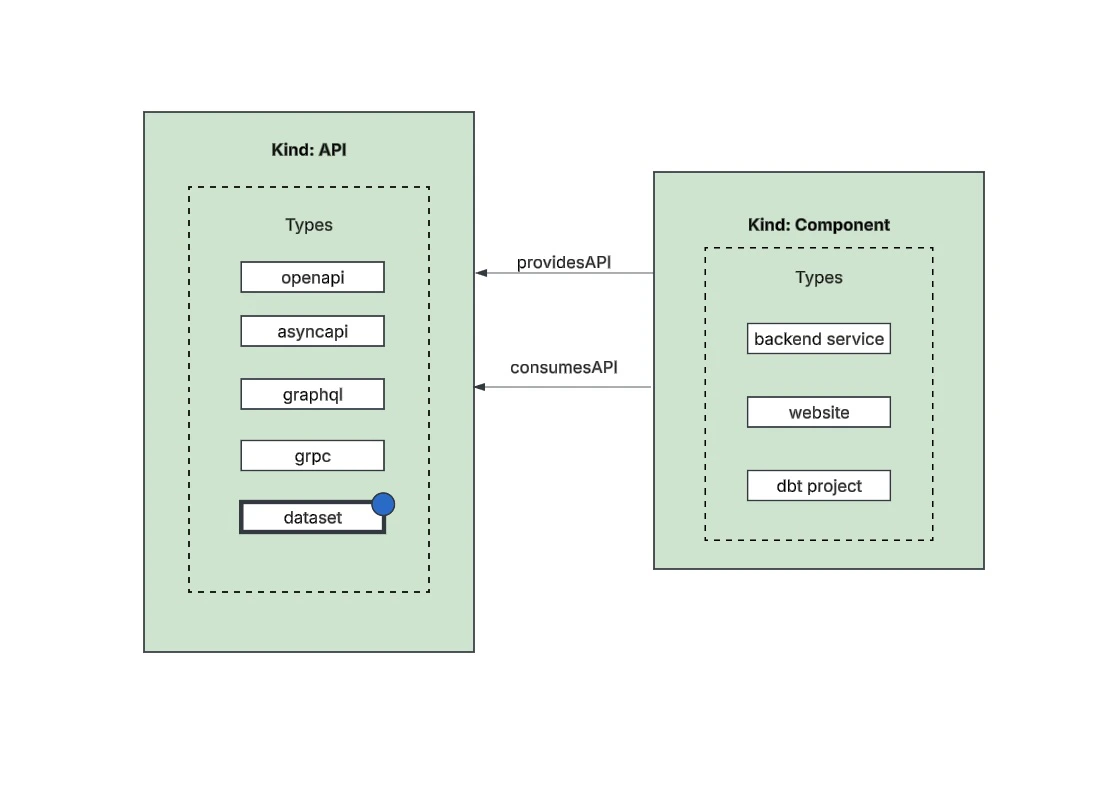
A table or view from the Data Registry becomes a Dataset API once it's added and modeled in the Software Catalog.
Datasets are modeled under the `kind:API` and `type:dataset` and act as an interface to a Component. Dataset APIs
are the main entity we care about in the Backstage Software Ecosystem Model. Dataset APIs are part of the Software
Catalog, which means they can be searched for in Portal's search.
 ## Catalog Requirements and Constraints
While ingesting datasets into the catalog provides a lot of benefits, it does impose some requirements that are
Backstage-specific. All API entities within the catalog are required to have an `owner` and `lifecycle` populated.
For datasets, the [Owner](https://backstage.io/docs/features/software-catalog/descriptor-format/#specowner-required-1)
metadata represents the [group](https://backstage.io/docs/features/software-catalog/descriptor-format/#kind-group)
or [user](https://backstage.io/docs/features/software-catalog/descriptor-format/#kind-user) in the Catalog that controls
or maintains the data. The [Lifecycle](https://backstage.io/docs/features/software-catalog/descriptor-format/#speclifecycle-required-1)
metadata denotes the development or support state of your dataset - for example, production.
Backstage accepts any lifecycle value, but an organization should take great care to establish a proper taxonomy for these.
The current set of well-known and common values for this field is:
* `experimental`: an experiment or early, non-production Dataset. This signals that users may prefer not to consume it over other more established Datasets or that there are low to no reliability guarantees
* `production`: an established, owned, and maintained Dataset
* `deprecated`: a Dataset that is at the end of its lifecycle, and may disappear at a later point in time
Because they are required, fallback defaults for these values are specified in the dataExperience config section
(see [configuration](./configuration)). Each source connector may also specify a mechanism to define the owner and
lifecycle for a specific dataset which is discussed further in their sections.
## Catalog Requirements and Constraints
While ingesting datasets into the catalog provides a lot of benefits, it does impose some requirements that are
Backstage-specific. All API entities within the catalog are required to have an `owner` and `lifecycle` populated.
For datasets, the [Owner](https://backstage.io/docs/features/software-catalog/descriptor-format/#specowner-required-1)
metadata represents the [group](https://backstage.io/docs/features/software-catalog/descriptor-format/#kind-group)
or [user](https://backstage.io/docs/features/software-catalog/descriptor-format/#kind-user) in the Catalog that controls
or maintains the data. The [Lifecycle](https://backstage.io/docs/features/software-catalog/descriptor-format/#speclifecycle-required-1)
metadata denotes the development or support state of your dataset - for example, production.
Backstage accepts any lifecycle value, but an organization should take great care to establish a proper taxonomy for these.
The current set of well-known and common values for this field is:
* `experimental`: an experiment or early, non-production Dataset. This signals that users may prefer not to consume it over other more established Datasets or that there are low to no reliability guarantees
* `production`: an established, owned, and maintained Dataset
* `deprecated`: a Dataset that is at the end of its lifecycle, and may disappear at a later point in time
Because they are required, fallback defaults for these values are specified in the dataExperience config section
(see [configuration](./configuration)). Each source connector may also specify a mechanism to define the owner and
lifecycle for a specific dataset which is discussed further in their sections.