> ## Documentation Index
> Fetch the complete documentation index at: https://backstage.spotify.com/docs/llms.txt
> Use this file to discover all available pages before exploring further.
# Configuration
> Configure Data Experience settings — catalog defaults, entity exclusions, connector cards, and history retention.
## Catalog
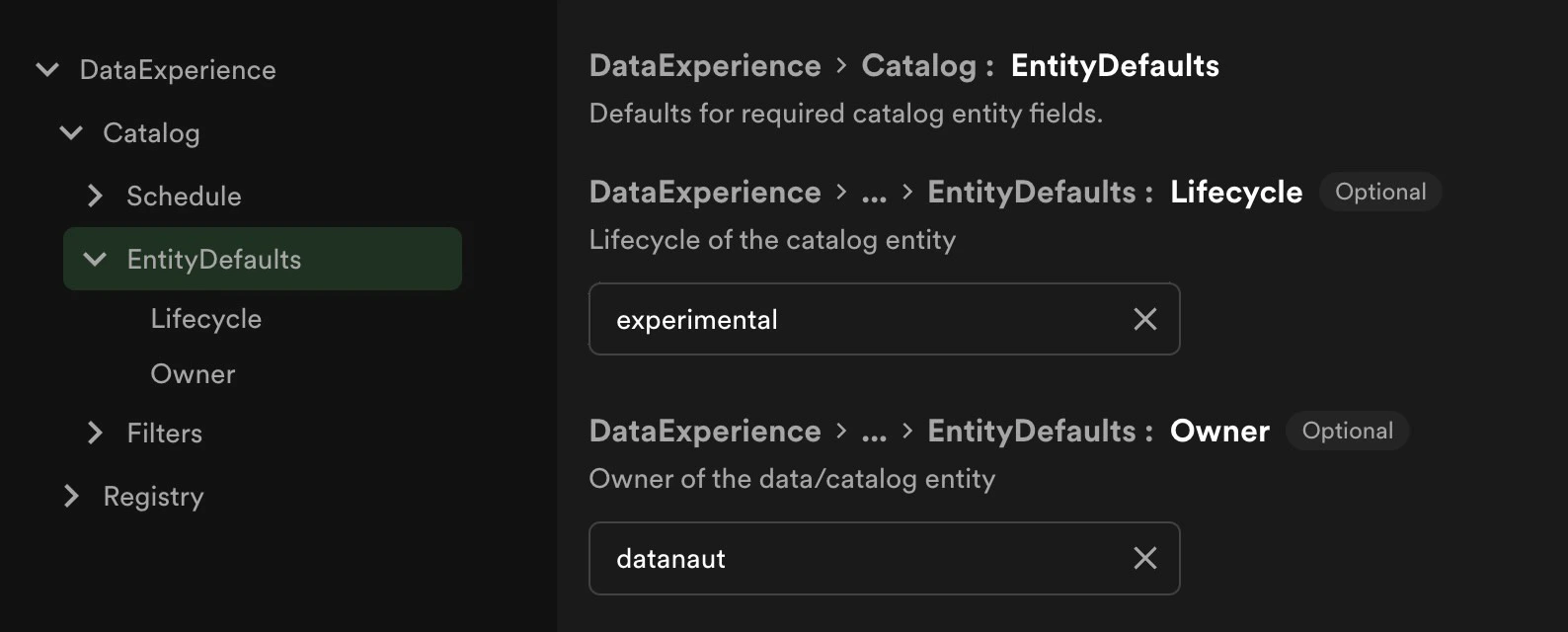
### Defaults
These are the final fallbacks you can set for required information for imported datasets. These will only be used if no
other options are available from the dataset or a source specific setting.
 ### Customizing Naming Validation
The software catalog has default constraints on naming for everything ingested. Given the length of some entities that may
come from the data registry, you may need to alter the maximum length of an entity name. You can see how to do that
[here](https://backstage.spotify.com/docs/portal/core-features-and-plugins/catalog/#customizing-the-validation-rules-for-the-entity-envelope).
### Omitting Datasets from Catalog
There are two mechanisms that allow users to ensure Datasets remain in the Data Registry, but don't get synced into Catalog. One is config-based (and therefore requires a Portal admin), which uses a pattern to filter and exclude datasets. The other is manually marking a Dataset for exclusion, which can be done by anyone from the entity page.
The 'Catalog Exclusions' tab on the Data Experience page will display all datasets in the Registry which are currently being excluded from the catalog based on the both configured filters and manual actions. The tab with manual exclusions displays the time the exclusion took place, the user who took the action, and a button to facilitate removing the exclusion.
#### Filters
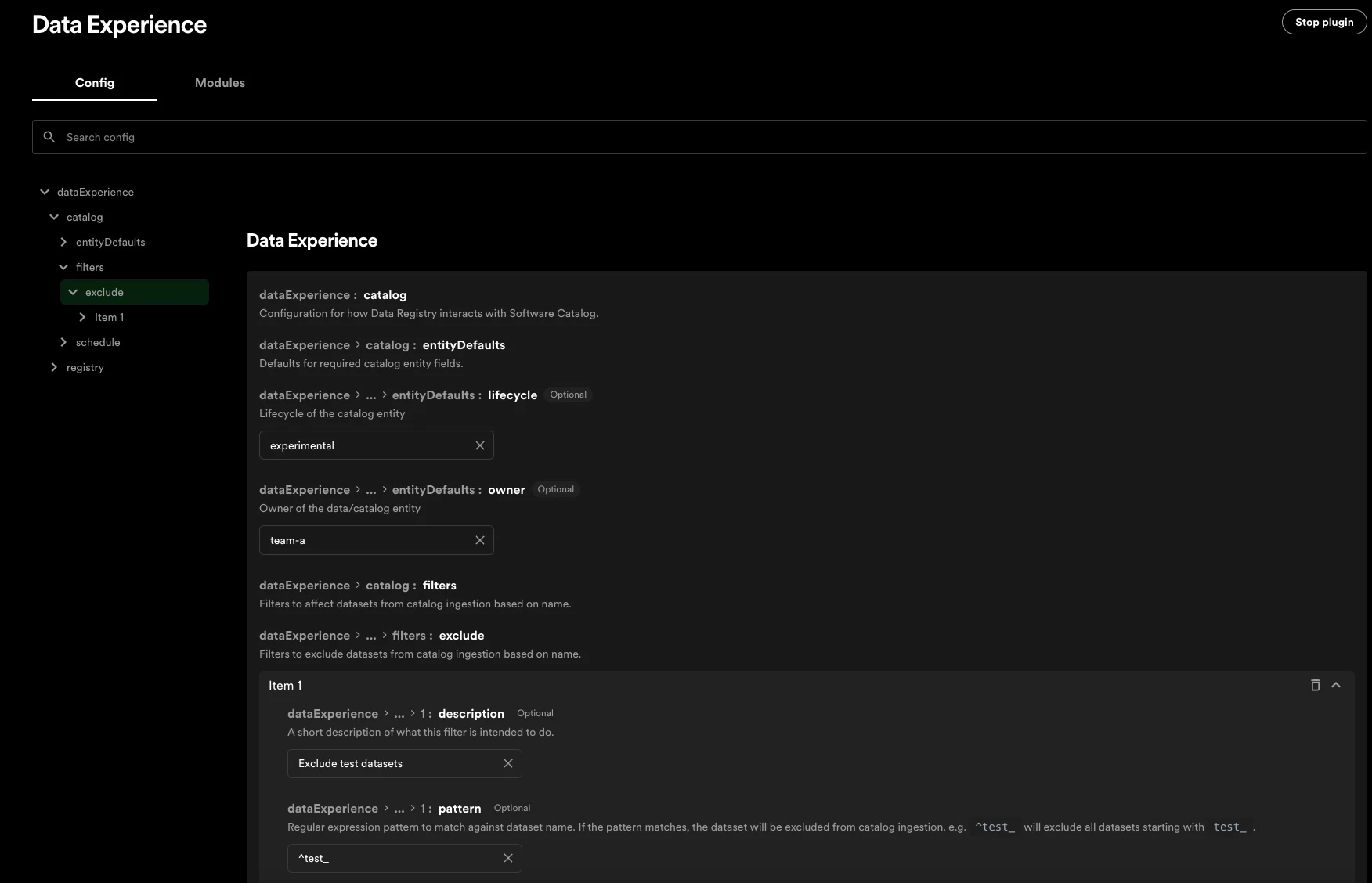
The Registry can be configured to exclude datasets from syncing to the Catalog. This may be useful for excluding test or dev tables for example. The 'filters' section of the config allows you to list out [regex patterns](https://developer.mozilla.org/en-US/docs/Web/JavaScript/Guide/Regular_expressions) that will be matched against to decide which dataset names to exclude.
### Customizing Naming Validation
The software catalog has default constraints on naming for everything ingested. Given the length of some entities that may
come from the data registry, you may need to alter the maximum length of an entity name. You can see how to do that
[here](https://backstage.spotify.com/docs/portal/core-features-and-plugins/catalog/#customizing-the-validation-rules-for-the-entity-envelope).
### Omitting Datasets from Catalog
There are two mechanisms that allow users to ensure Datasets remain in the Data Registry, but don't get synced into Catalog. One is config-based (and therefore requires a Portal admin), which uses a pattern to filter and exclude datasets. The other is manually marking a Dataset for exclusion, which can be done by anyone from the entity page.
The 'Catalog Exclusions' tab on the Data Experience page will display all datasets in the Registry which are currently being excluded from the catalog based on the both configured filters and manual actions. The tab with manual exclusions displays the time the exclusion took place, the user who took the action, and a button to facilitate removing the exclusion.
#### Filters
The Registry can be configured to exclude datasets from syncing to the Catalog. This may be useful for excluding test or dev tables for example. The 'filters' section of the config allows you to list out [regex patterns](https://developer.mozilla.org/en-US/docs/Web/JavaScript/Guide/Regular_expressions) that will be matched against to decide which dataset names to exclude.
 #### Manually Excluding a Dataset
From a dataset entity page in Catalog (under the three-dots menu in the top right of an entity view), users can click 'Exclude dataset from Catalog' to add the dataset to the denylist. The next time the scheduled sync from Data Registry to Catalog executes, the dataset will be removed from Catalog.
### Schedules
The registry to catalog ingest works on an event based system so entities will be available directly after ingest. The clean up schedule runs on a timer, so deleted items can stay in the catalog for short periods of time.
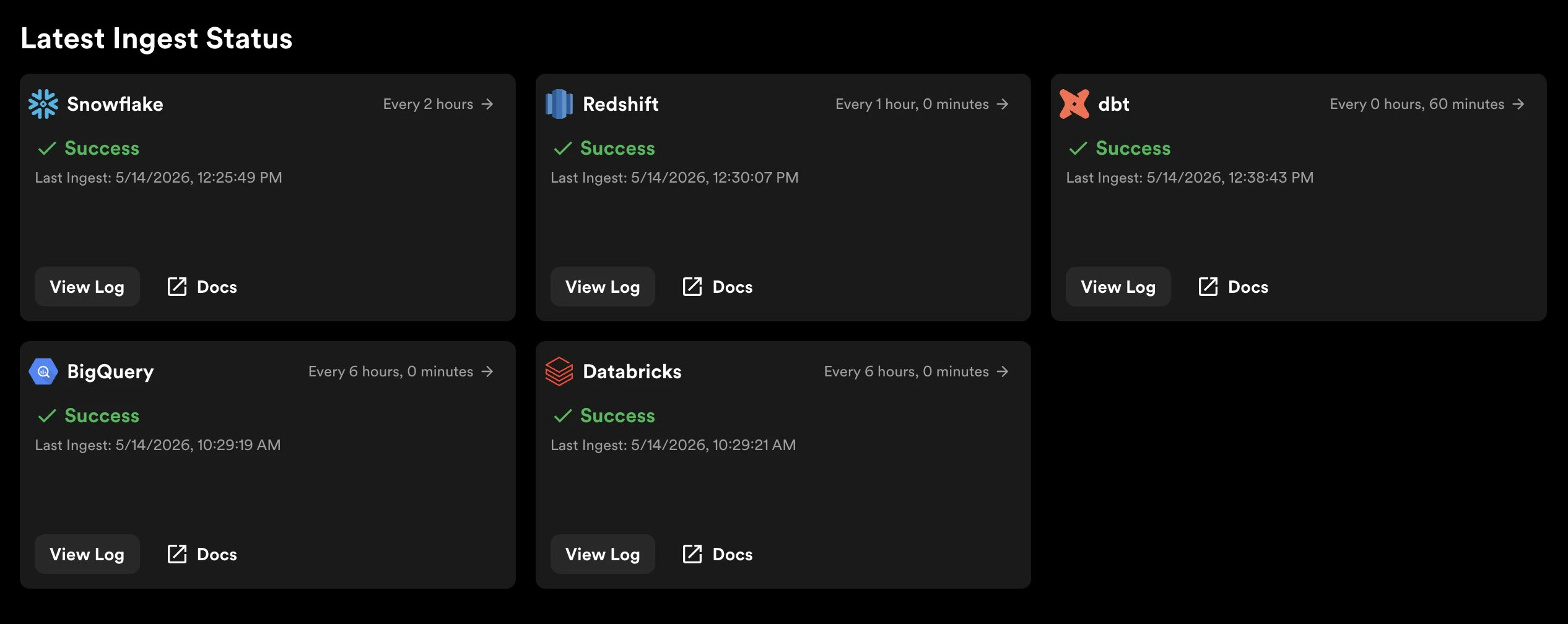
To do an ad hoc ingestion for a connector, one must be a portal admin or have `data-registry.ingest-job.create` permissions through RBAC. Doing this will ignore the schedule of the connector and do an a new ingest from the data source into the registry right away. This option is available in the Data Experience tab under 'Ingests'. Each connector has that option in the top right corner of their display, where the last ingest time is noted.
#### Manually Excluding a Dataset
From a dataset entity page in Catalog (under the three-dots menu in the top right of an entity view), users can click 'Exclude dataset from Catalog' to add the dataset to the denylist. The next time the scheduled sync from Data Registry to Catalog executes, the dataset will be removed from Catalog.
### Schedules
The registry to catalog ingest works on an event based system so entities will be available directly after ingest. The clean up schedule runs on a timer, so deleted items can stay in the catalog for short periods of time.
To do an ad hoc ingestion for a connector, one must be a portal admin or have `data-registry.ingest-job.create` permissions through RBAC. Doing this will ignore the schedule of the connector and do an a new ingest from the data source into the registry right away. This option is available in the Data Experience tab under 'Ingests'. Each connector has that option in the top right corner of their display, where the last ingest time is noted.
 ## Registry
`entityRetentionTimeInDays` controls how long entities (either datasets or dbt projects) will persist in the registry after they stop appearing in ingestions from the source systems. By default, this value is 0. Setting this config value to 10 for example, would mean an arbitrary BigQuery table would have to be missing from the ingestions for 10 consecutive days before being removed from Portal. Configuring this value to a higher number might be desirable if you want to be insulated from losing an entity's history if an entity was temporarily missing from an ingestion, but not truly deleted (testing out config changes, permissions changing, etc).
For example, say a BigQuery table was ingested into the Data Registry, but
then deleted the next day. In the next scheduled BigQuery ingestion, this
table represented in the Data Registry would be removed from the Registry, and
eventually the Software Catalog. This means there would no longer be a Dataset
Entity page for this table, nor any reference to it in Portal. If the table is
added back in BigQuery itself, then it will be re-ingested into the Data
Registry (and sync into the Software Catalog).
### History
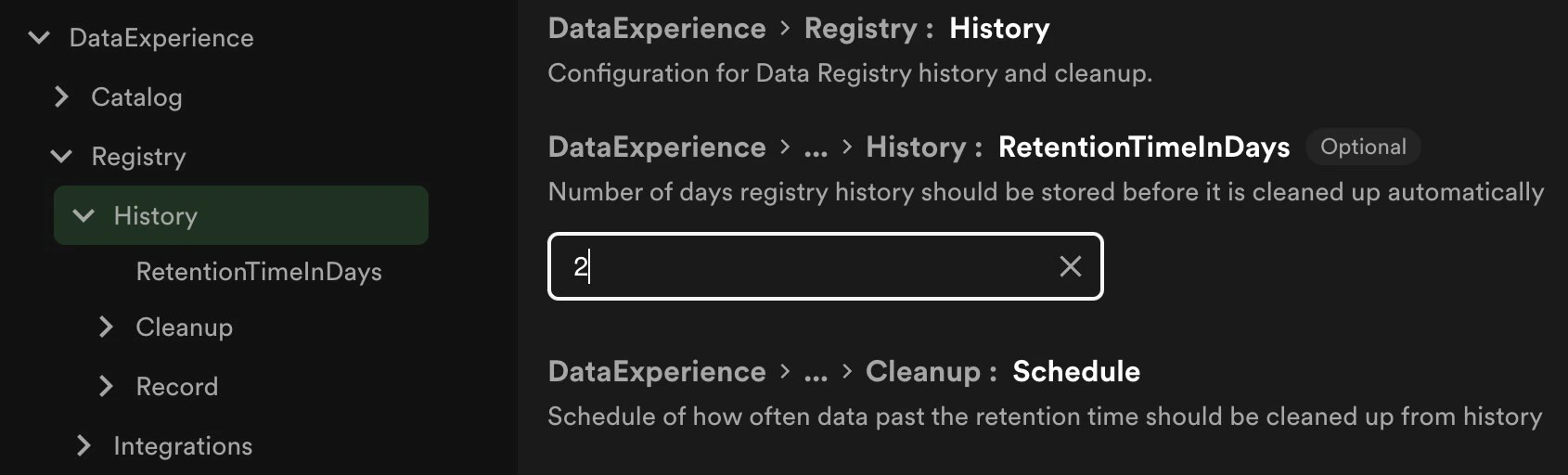
The registry keeps history for easier reference or rollbacks of data. The default setting if not configured is 90 days worth
of data but this can be fine tuned in the `registry` configs by setting `retentionTimeInDays`.
`cleanup` schedules how often data past its retention is cleaned up from the history. The scheduler is in the same format as
the [catalog sync](#schedules). The default is every day at midnight if unset.
`record` is a finer scheduler that determines how often a snapshot of the registry is taken. The scheduler is in the same format
as the [catalog sync](#schedules). The default if unset is every 12 hours.
## Registry
`entityRetentionTimeInDays` controls how long entities (either datasets or dbt projects) will persist in the registry after they stop appearing in ingestions from the source systems. By default, this value is 0. Setting this config value to 10 for example, would mean an arbitrary BigQuery table would have to be missing from the ingestions for 10 consecutive days before being removed from Portal. Configuring this value to a higher number might be desirable if you want to be insulated from losing an entity's history if an entity was temporarily missing from an ingestion, but not truly deleted (testing out config changes, permissions changing, etc).
For example, say a BigQuery table was ingested into the Data Registry, but
then deleted the next day. In the next scheduled BigQuery ingestion, this
table represented in the Data Registry would be removed from the Registry, and
eventually the Software Catalog. This means there would no longer be a Dataset
Entity page for this table, nor any reference to it in Portal. If the table is
added back in BigQuery itself, then it will be re-ingested into the Data
Registry (and sync into the Software Catalog).
### History
The registry keeps history for easier reference or rollbacks of data. The default setting if not configured is 90 days worth
of data but this can be fine tuned in the `registry` configs by setting `retentionTimeInDays`.
`cleanup` schedules how often data past its retention is cleaned up from the history. The scheduler is in the same format as
the [catalog sync](#schedules). The default is every day at midnight if unset.
`record` is a finer scheduler that determines how often a snapshot of the registry is taken. The scheduler is in the same format
as the [catalog sync](#schedules). The default if unset is every 12 hours.
 ### Integration Defaults
The registry has default settings available for scheduling also. These defaults are for how often the sources will sync to the
registry if it is not explicitly defined at an individual source level. The config settings are the same available on the catalog,
reference [Schedules](#schedules) above.
### Integration Defaults
The registry has default settings available for scheduling also. These defaults are for how often the sources will sync to the
registry if it is not explicitly defined at an individual source level. The config settings are the same available on the catalog,
reference [Schedules](#schedules) above.