> ## Documentation Index
> Fetch the complete documentation index at: https://backstage.spotify.com/docs/llms.txt
> Use this file to discover all available pages before exploring further.
# Creating a Single Entity
Create individual catalog entities directly from Portal UI without going through the bulk ingestion workflow. This is useful when you need to register a single component, API, system, or domain on the fly.
## Accessing Single Entity Create
To create a new entity:
1. Click **Manage Catalog** in the top right of the Catalog Page
2. Select **Create Entity**
 ## Step 1: Choose Entity Kind
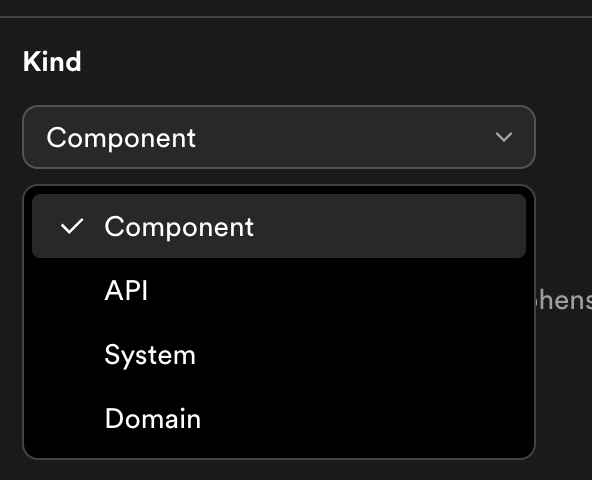
Select the type of entity you want to create:
* **Component** — a software component (service, website, library)
* **API** — an API definition (REST, gRPC, AsyncAPI)
* **System** — a collection of related components and APIs
* **Domain** — a high-level grouping of systems
The form fields update based on the kind you select, since each kind has different spec fields.
## Step 1: Choose Entity Kind
Select the type of entity you want to create:
* **Component** — a software component (service, website, library)
* **API** — an API definition (REST, gRPC, AsyncAPI)
* **System** — a collection of related components and APIs
* **Domain** — a high-level grouping of systems
The form fields update based on the kind you select, since each kind has different spec fields.
 ## Step 2: Fill in Metadata
Provide the core metadata for your entity:
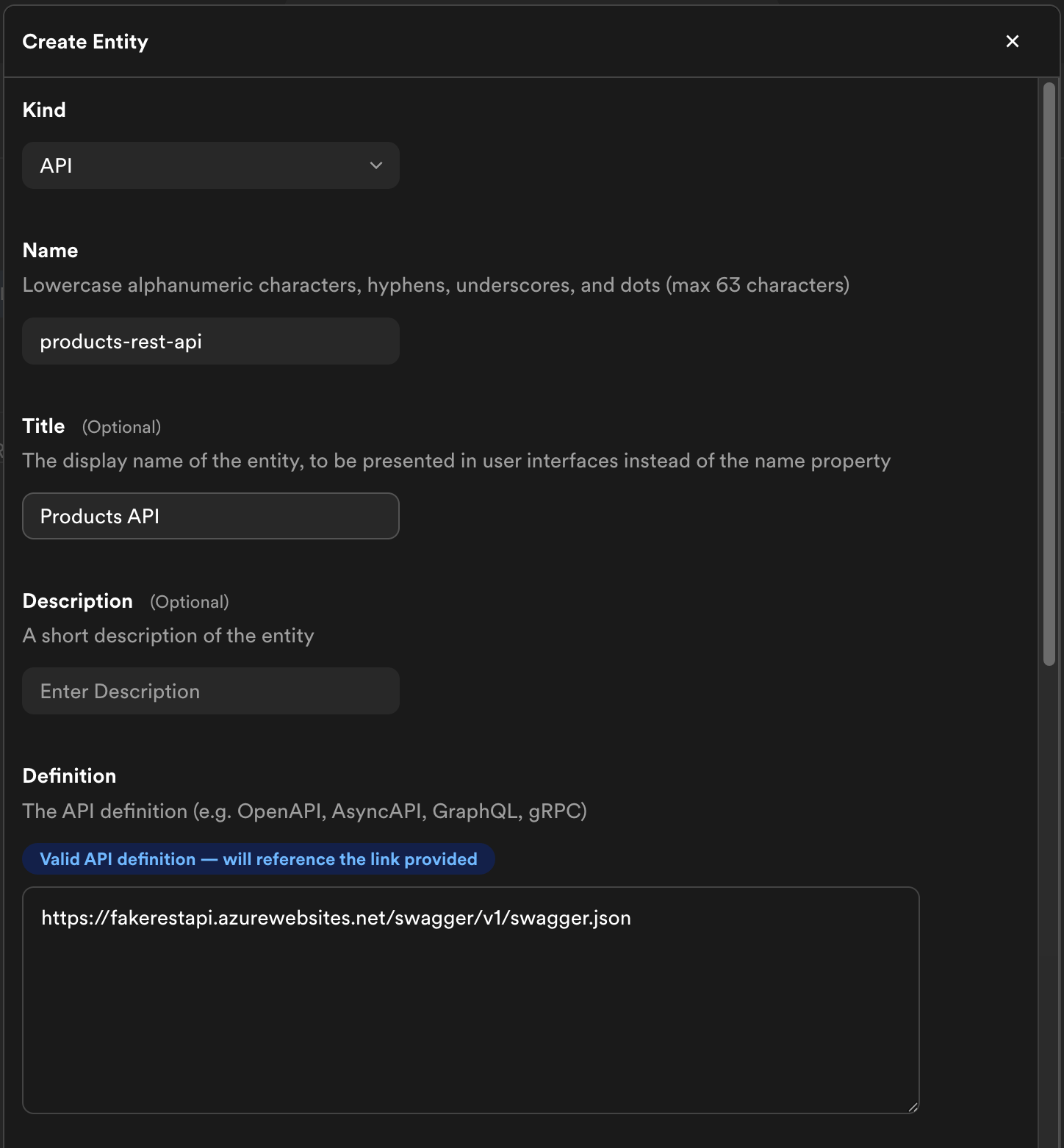
* **Name** (required) — a unique identifier, 1–63 characters, lowercase alphanumeric with hyphens, underscores, and dots
* **Title** — a human-readable display name
* **Description** — a short summary of the entity
## Step 3: Fill in Spec Fields
The required spec fields depend on the entity kind you selected:
| Kind | Required fields | Optional fields |
| --------- | ------------------------------------------ | ----------------------------------------------------------------------- |
| Component | `type`, `owner`, `lifecycle` | `system`, `dependsOn`, `subcomponentOf`, `providesApis`, `consumesApis` |
| API | `type`, `owner`, `lifecycle`, `definition` | `system` |
| System | `type`, `owner` | `domain` |
| Domain | `type`, `owner` | `subdomainOf` |
### API Definition as a Link
When creating an **API** kind entity, the **definition** field holds the API specification. Instead of pasting the full spec inline, you can provide a URL that points to the hosted definition:
```
https://example.com/api/openapi.yaml
```
Portal resolves the URL and renders the API specification on the entity page. This keeps your entity definition lightweight and ensures the spec stays in sync with its source.
## Step 2: Fill in Metadata
Provide the core metadata for your entity:
* **Name** (required) — a unique identifier, 1–63 characters, lowercase alphanumeric with hyphens, underscores, and dots
* **Title** — a human-readable display name
* **Description** — a short summary of the entity
## Step 3: Fill in Spec Fields
The required spec fields depend on the entity kind you selected:
| Kind | Required fields | Optional fields |
| --------- | ------------------------------------------ | ----------------------------------------------------------------------- |
| Component | `type`, `owner`, `lifecycle` | `system`, `dependsOn`, `subcomponentOf`, `providesApis`, `consumesApis` |
| API | `type`, `owner`, `lifecycle`, `definition` | `system` |
| System | `type`, `owner` | `domain` |
| Domain | `type`, `owner` | `subdomainOf` |
### API Definition as a Link
When creating an **API** kind entity, the **definition** field holds the API specification. Instead of pasting the full spec inline, you can provide a URL that points to the hosted definition:
```
https://example.com/api/openapi.yaml
```
Portal resolves the URL and renders the API specification on the entity page. This keeps your entity definition lightweight and ensures the spec stays in sync with its source.
 ## Step 4: Add Additional Metadata (Optional)
You can enrich your entity with additional metadata beyond the required fields.
### Annotations
Key-value pairs for non-identifying metadata. Annotations are commonly used by plugins and integrations to store configuration — for example, linking to a PagerDuty service or a CI/CD pipeline.
### Labels
Key-value pairs for filtering and categorization. Unlike annotations, labels are intended for user-defined classification and can be used to filter entities in the catalog.
### Tags
A list of free-form string tags for discovery. Tags appear on the entity's catalog page and can be used to search and filter entities.
### Links
External URLs attached to your entity. Links appear on the entity's page in Portal and are a good way to surface related documentation, dashboards, or runbooks. Each link supports:
* **URL** (required) — the link destination
* **Title** — display text for the link
* **Icon** — an icon identifier (e.g., `docs`, `dashboard`)
## Step 5: Review and Create
Review your entity details and click **Create**. The entity is immediately registered in the catalog and you'll be redirected to its page.
## Related Documentation
* [Bulk catalog ingestion](../catalog-builder/) — import many repositories at once
* [Updating Components](./bulk-editing) — edit entities after creation
## Step 4: Add Additional Metadata (Optional)
You can enrich your entity with additional metadata beyond the required fields.
### Annotations
Key-value pairs for non-identifying metadata. Annotations are commonly used by plugins and integrations to store configuration — for example, linking to a PagerDuty service or a CI/CD pipeline.
### Labels
Key-value pairs for filtering and categorization. Unlike annotations, labels are intended for user-defined classification and can be used to filter entities in the catalog.
### Tags
A list of free-form string tags for discovery. Tags appear on the entity's catalog page and can be used to search and filter entities.
### Links
External URLs attached to your entity. Links appear on the entity's page in Portal and are a good way to surface related documentation, dashboards, or runbooks. Each link supports:
* **URL** (required) — the link destination
* **Title** — display text for the link
* **Icon** — an icon identifier (e.g., `docs`, `dashboard`)
## Step 5: Review and Create
Review your entity details and click **Create**. The entity is immediately registered in the catalog and you'll be redirected to its page.
## Related Documentation
* [Bulk catalog ingestion](../catalog-builder/) — import many repositories at once
* [Updating Components](./bulk-editing) — edit entities after creation