> ## Documentation Index
> Fetch the complete documentation index at: https://backstage.spotify.com/docs/llms.txt
> Use this file to discover all available pages before exploring further.
# Jira
> Extract Jira issues search results and issue counts as Soundcheck facts using basic or personal access token authentication.
The Jira integration plugin for [Soundcheck](https://backstage.spotify.com/plugins/soundcheck/) supports the extraction of the following facts:
* [Issues Search](#collecting-issues-search-fact)
* [Issues Count](#collecting-issues-count-fact)
## Prerequisites
### Configure Jira integration in Backstage
Integrations are configured at the root level of `app-config.yaml`. Here's an example configuration for Jira:
1. Basic authentication option:
```yaml theme={"theme":{"light":"github-light","dark":"dracula"}}
soundcheck:
collectors:
jira:
baseUrl: https://jira-instance.atlassian.net
username: username # This could be your email or username that you use to log in to jira
apiToken: token # Generate new token https://id.atlassian.com/manage-profile/security/api-tokens
```
2. Personal Access token (bearer token) authentication option:
```yaml theme={"theme":{"light":"github-light","dark":"dracula"}}
soundcheck:
collectors:
jira:
baseUrl: https://jira-instance.atlassian.net
personalAccessToken: token # Generate new token https://confluence.atlassian.com/enterprise/using-personal-access-tokens-1026032365.html
```
### Add the JiraFactCollector to Soundcheck
First, add the `@spotify/backstage-plugin-soundcheck-backend-module-jira` package:
```bash theme={"theme":{"light":"github-light","dark":"dracula"}}
yarn workspace backend add @spotify/backstage-plugin-soundcheck-backend-module-jira
```
Then add the following to your `packages/backend/src/index.ts` file:
```ts packages/backend/src/index.ts highlight={4} theme={"theme":{"light":"github-light","dark":"dracula"}}
const backend = createBackend();
backend.add(import('@spotify/backstage-plugin-soundcheck-backend'));
backend.add(import('@spotify/backstage-plugin-soundcheck-backend-module-jira'));
// ...
backend.start();
```
Consult the [Soundcheck Backend documentation](../../../setup-and-installation#backend-setup) for additional details on setting up the Soundcheck backend.
## Plugin Configuration
The collection of Jira facts is driven by configuration. To learn more about the configuration, consult the [Defining Jira Fact Collectors](#defining-jira-fact-collectors) section.
Jira Fact Collector can be configured via YAML or No-Code UI. If you configure it via both YAML and No-Code UI, the configurations will be merged.
It's preferable to choose a single source for the Fact Collectors configuration (either No-Code UI or YAML) to avoid confusing merge results.
### No-Code UI Configuration Option
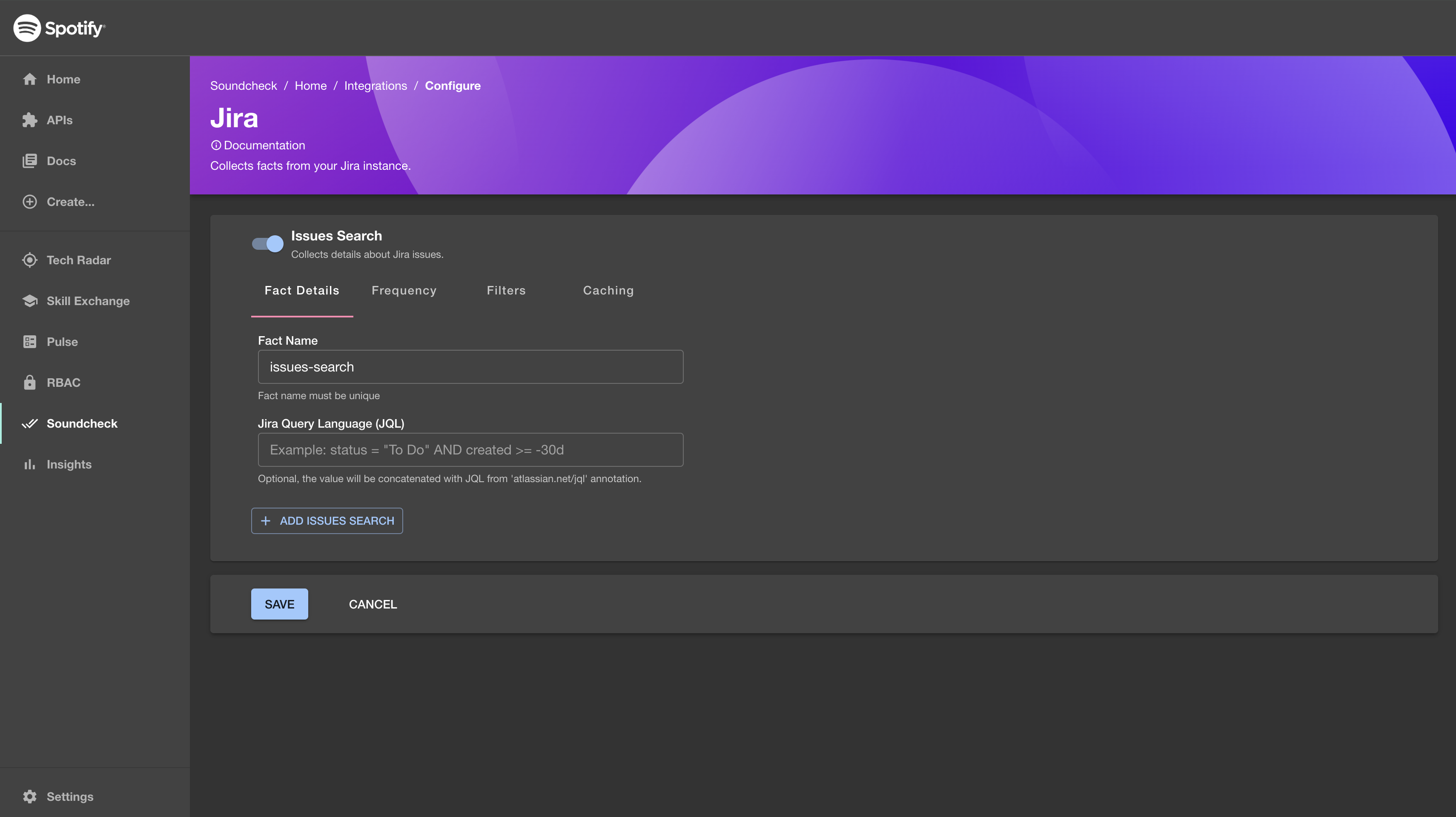
1. Make sure the prerequisite [Configure Jira integration in Backstage](#configure-jira-integration-in-backstage) is completed and Jira instance details are configured.
2. To enable the Jira Integration, go to `Soundcheck > Integrations > Jira` and click the `Configure` button. To learn more about the No-Code UI config, see the [Configuring a fact collector (integration) via the no-code UI](../index#configuring-a-fact-collector-integration-via-the-no-code-ui).
 ### YAML Configuration Option
1. Create a `jira-facts-collectors.yaml` file in the root of your Backstage repository and fill in all your **Jira Fact Collectors**.
A simple example Jira fact collector is listed below.
```yaml theme={"theme":{"light":"github-light","dark":"dracula"}}
---
baseUrl: https://jira-instance.atlassian.net
username: username # This could be your email or username that you use to log in to jira
apiToken: token # Generate new token https://id.atlassian.com/manage-profile/security/api-tokens
collects:
- type: issues-search
filter:
- spec.lifecycle: 'production'
spec.type: 'website'
cache: false
jql: status="To Do"
- type: issues-count
filter:
- spec.lifecycle: 'production'
spec.type: 'website'
cache: false
jql: status="To Do"
```
**Note:** this file will be loaded at runtime along with the rest of your Backstage configuration files, so make sure it's available in deployed environments in the same way as your `app-config.yaml` files.
2. Add a Soundcheck collectors field to the `app-config.yaml` and reference the newly created `jira-facts-collectors.yaml` file.
```yaml theme={"theme":{"light":"github-light","dark":"dracula"}}
# app-config.yaml
soundcheck:
collectors:
jira:
$include: ./jira-facts-collectors.yaml
```
## Defining Jira Fact Collectors
This section describes the data shape and semantics of **Jira Fact Collectors**.
### Overall Shape Of A Jira Fact Collector
The following is an example of a descriptor file for a **Jira Fact Collector**:
```yaml theme={"theme":{"light":"github-light","dark":"dracula"}}
---
baseUrl: https://jira-instance.atlassian.net
username: username # This could be your email or username that you use to log in to jira
apiToken: token # Generate new token https://id.atlassian.com/manage-profile/security/api-tokens
collects:
- type: issues-search
filter:
- spec.lifecycle: 'production'
spec.type: 'website'
cache: false
jql: status="To Do"
- type: issues-count
filter:
- spec.lifecycle: 'production'
spec.type: 'website'
cache: false
jql: status="To Do"
```
Below are the details for each field.
#### `baseUrl` \[required]
The base URL of the Jira instance to use.
#### `apiToken` \[optional]
Jira API token to use for basic authentication (together with username). If not provided, the plugin will attempt to use personalAccessToken as bearer token for authentication.
#### `username` \[optional]
Jira username or email to use for basic authentication (together with apiToken). If not provided, the plugin will attempt to use personalAccessToken as bearer token for authentication.
#### `personalAccessToken` \[optional]
Jira Personal Access token to use for authentication as bearer token. If not provided, the plugin will attempt to use username and apiToken for basic authentication.
#### `collects` \[required]
An array describing which facts to collect.
### Overall Shape Of A Fact Collector
Each collector supports the fields described below.
#### `type` \[required]
The type of the extractor (e.g. issues-search, issues-count).
#### `frequency` \[optional]
The frequency at which the fact collection should be executed. Possible values are either a cron expression `{ cron: ... }` or [HumanDuration](https://backstage.io/docs/reference/types.humanduration).
If provided, it overrides the default frequency provided at the top level. If not provided, it defaults to the frequency provided at the top level. If neither extractor's frequency nor default frequency is provided, the fact will only be collected on demand.
Example:
```yaml theme={"theme":{"light":"github-light","dark":"dracula"}}
frequency:
minutes: 10
```
#### `initialDelay` \[optional]
The amount of time that should pass before the first invocation happens. Possible values are either a cron expression `{ cron: ... }` or [HumanDuration](https://backstage.io/docs/reference/types.humanduration).
Example:
```yaml theme={"theme":{"light":"github-light","dark":"dracula"}}
initialDelay:
seconds: 30
```
#### `batchSize` \[optional]
The number of entities to collect facts for at once. Optional, the default value is 1.
**Note**: Fact collection for a batch of entities is still considered as one hit towards the rate limits
by the Soundcheck [Rate Limiting](#rate-limiting-optional) engine, while the actual number of hits
will be equal to the `batchSize`.
Example:
```yaml theme={"theme":{"light":"github-light","dark":"dracula"}}
batchSize: 100
```
#### `filter` \[optional]
A filter specifying which entities to collect the specified facts for. Matches the [filter format](https://backstage.io/docs/reference/catalog-client.entityfilterquery) used by the Catalog API.
If provided, it overrides the default filter provided at the top level. If not provided, it defaults to the filter provided at the top level. If neither extractor's filter nor default filter is provided, the fact will be collected for all entities.
See [filters](/plugins/soundcheck/core-concepts/filters) for more details.
#### `exclude` \[optional]
Entities matching this filter will be skipped during the fact collection process. Can be used in combination with filter. Matches the [filter format](https://backstage.io/docs/reference/catalog-client.entityfilterquery) used by the Catalog API.
```yaml theme={"theme":{"light":"github-light","dark":"dracula"}}
filter:
- kind: component
exclude:
- spec.type: documentation
```
#### `cache` \[optional]
If the collected facts should be cached, and if so for how long. Possible values are either `true` or `false` or a nested `{ duration:` [HumanDuration](https://backstage.io/docs/reference/types.humanduration) `}` field.
If provided it, overrides the default cache config provided at the top level. If not provided, it defaults to the cache config provided at the top level. If neither extractor's cache nor default cache config is provided, the fact will not be cached.
Example:
```yaml theme={"theme":{"light":"github-light","dark":"dracula"}}
cache:
duration:
hours: 24
```
#### `jql` \[optional]
You can use the Jira Query Language (JQL) to specify criteria to search for issues in Jira.
Check out [JQL docs](https://support.atlassian.com/jira-service-management-cloud/docs/use-advanced-search-with-jira-query-language-jql/) for more examples.
### Rate Limiting (Optional)
This fact collector can be rate limited in Soundcheck using the following configuration:
```yaml theme={"theme":{"light":"github-light","dark":"dracula"}}
soundcheck:
job:
workers:
jira:
limiter:
max: 400
duration: 60000
```
Jira API has a [rate limiting policy in place](https://developer.atlassian.com/cloud/jira/platform/rate-limiting/). We recommend setting your rate limit to something that will avoid exceeding your quota, i.e. in the example above, we set the rate limit to 400 executions every minute.
This fact collector handles 429 rate limit errors from Jira. Soundcheck will automatically wait and retry requests that are rate limited.
## Entity configuration
In your `catalog-info.yaml` file, add the following metadata annotation to allow the plugin to map an entity to a project in Jira.
```yaml theme={"theme":{"light":"github-light","dark":"dracula"}}
metadata:
annotations:
atlassian.net/jql: project =
```
Check out [JQL docs](https://support.atlassian.com/jira-service-management-cloud/docs/use-advanced-search-with-jira-query-language-jql/) for more examples.
## Collecting Issues Search Fact
An **Issues Search Fact** contains information about issues from:
* [Get issues using JQL](https://developer.atlassian.com/server/jira/platform/rest/v11000/api-group-search/#api-api-2-search-get) API for Jira Server (hosted) instances.
* [Search for issues using JQL enhanced search](https://developer.atlassian.com/cloud/jira/platform/rest/v3/api-group-issue-search/#api-rest-api-3-search-jql-post) API for Jira Cloud instances.
Jira has recently deprecated and removed their [Get issues using
JQL](https://developer.atlassian.com/cloud/jira/platform/rest/v2/api-group-issue-search/#api-rest-api-2-search-get)
API for Jira Cloud instances. If you are using Jira Cloud, Soundcheck will
detect it automatically and the fact will be collected from Jira's new [Search
for issues using JQL enhanced
search](https://developer.atlassian.com/cloud/jira/platform/rest/v3/api-group-issue-search/#api-rest-api-3-search-jql-post)
API. Please be mindful of the minor differences in the output schemas of these
two APIs. You may need to update the checks that depend on this fact.
If JQL is defined in both places: `soundcheck.collectors.jira.collects[?(@.type === 'issues-search')].jql` and `metadata.annotations["atlassian.net/jql"]`, the plugin will concatenate them with an `AND`. Plugin will not remove any duplicate params.
This is useful if you want to create reusable facts, for example you can create fact that will look at issues with the status `To Do` like this:
```yaml theme={"theme":{"light":"github-light","dark":"dracula"}}
soundcheck:
collectors:
jira:
collects:
- factName: todoIssues
type: issues-search
jql: status="To Do"
```
In the next step you may want to restrict the `jql` to only look for issues with status `To Do` *AND* where project key is `PROJECT`. In your entity you would add following annotation:
```yaml theme={"theme":{"light":"github-light","dark":"dracula"}}
metadata:
annotations:
atlassian.net/jql: project = "PROJECT"
```
The next step is to create a check that could look like this:
```yaml theme={"theme":{"light":"github-light","dark":"dracula"}}
soundcheck:
checks:
- id: has_no_todo_tickets
rule:
factRef: jira:default/todoIssues
path: $.issues
operator: hasLengthOf
value: 0
```
And finally add it to a track:
```yaml theme={"theme":{"light":"github-light","dark":"dracula"}}
soundcheck:
tracks:
- id: product-certified
name: Product certified
ownerEntityRef: group:default/example-owner
description: >
Improve quality of product backlog
documentationURL: https://www.backstage.io
filter:
catalog:
metadata.tags: someTagValue
levels:
- ordinal: 1
checks:
- id: has_no_todo_tickets
name: checks if there are any todo tickets
description: >
This checks if there are any todo tickets for the project
```
The plugin will call the JIRA endpoint with following jql value `(status="To Do") AND (project = "PROJECT")` for all entities with tag `someTagValue`.
If there are 0 issues with status `To Do` for project `PROJECT` the check will be green, otherwise it will fail.
The following is an example response from Jira Issues Search API:
```json theme={"theme":{"light":"github-light","dark":"dracula"}}
{
"issues": [
{
"expand": "html",
"id": "10230",
"self": "http://localhost:7007/api/soundcheck/issue/BULK-62",
"key": "BULK-62",
"fields": {
"summary": "testing",
"timetracking": null,
"issuetype": {
"self": "http://localhost:7007/api/soundcheck/issuetype/5",
"id": "5",
"description": "The sub-task of the issue",
"iconUrl": "http://localhost:7007/images/icons/issue_subtask.gif",
"name": "Sub-task",
"subtask": true
},
"transitions": "http://localhost:7007/api/soundcheck/issue/BULK-62/transitions"
},
"customfield_10071": null
},
{
"expand": "html",
"id": "10004",
"self": "http://localhost:7007/api/soundcheck/issue/BULK-47",
"key": "BULK-47",
"fields": {
"summary": "Cheese v1 2.0 issue",
"timetracking": null,
"issuetype": {
"self": "http://localhost:7007/api/soundcheck/issuetype/3",
"id": "3",
"description": "A task that needs to be done.",
"iconUrl": "http://localhost:7007/images/icons/task.gif",
"name": "Task",
"subtask": false
},
"transitions": "http://localhost:7007/api/soundcheck/issue/BULK-47/transitions"
}
}
]
}
```
## Collecting Issues Count Fact
An **Issues Count Fact** contains information about issues from:
* [Get issues using JQL](https://developer.atlassian.com/server/jira/platform/rest/v11000/api-group-search/#api-api-2-search-get) API for Jira Server (hosted) instances.
* [Count issues using JQL](https://developer.atlassian.com/cloud/jira/platform/rest/v3/api-group-issue-search/#api-rest-api-3-search-approximate-count-post) API for Jira Cloud instances.
If JQL is defined in both places: `soundcheck.collectors.jira.collects[?(@.type === 'issues-count')].jql` and `metadata.annotations["atlassian.net/jql"]`, the plugin will concatenate them with an `AND`. Plugin will not remove any duplicate params.
This is useful if you want to create reusable facts, for example you can create fact that will look at issues with the status `To Do` like this:
```yaml theme={"theme":{"light":"github-light","dark":"dracula"}}
soundcheck:
collectors:
jira:
collects:
- factName: todoIssues
type: issues-count
jql: status="To Do"
```
In the next step you may want to restrict the `jql` to only look for issues with status `To Do` *AND* where project key is `PROJECT`. In your entity you would add following annotation:
```yaml theme={"theme":{"light":"github-light","dark":"dracula"}}
metadata:
annotations:
atlassian.net/jql: project = "PROJECT"
```
The next step is to create a check that could look like this:
```yaml theme={"theme":{"light":"github-light","dark":"dracula"}}
soundcheck:
checks:
- id: has_no_todo_tickets
rule:
factRef: jira:default/todoIssues
path: $.total
operator: equal
value: 0
```
And finally add it to a track:
```yaml theme={"theme":{"light":"github-light","dark":"dracula"}}
soundcheck:
tracks:
- id: product-certified
name: Product certified
ownerEntityRef: group:default/example-owner
description: >
Improve quality of product backlog
documentationURL: https://www.backstage.io
filter:
catalog:
metadata.tags: someTagValue
levels:
- ordinal: 1
checks:
- id: has_no_todo_tickets
name: checks if there are any todo tickets
description: >
This checks if there are any todo tickets for the project
```
The plugin will call the JIRA endpoint with following jql value `(status="To Do") AND (project = "PROJECT")` for all entities with tag `someTagValue`.
If there are 0 issues with status `To Do` for project `PROJECT` the check will be green, otherwise it will fail.
The following is an example response from Jira Issues Count API.
```json theme={"theme":{"light":"github-light","dark":"dracula"}}
{
"total": 10
}
```
### YAML Configuration Option
1. Create a `jira-facts-collectors.yaml` file in the root of your Backstage repository and fill in all your **Jira Fact Collectors**.
A simple example Jira fact collector is listed below.
```yaml theme={"theme":{"light":"github-light","dark":"dracula"}}
---
baseUrl: https://jira-instance.atlassian.net
username: username # This could be your email or username that you use to log in to jira
apiToken: token # Generate new token https://id.atlassian.com/manage-profile/security/api-tokens
collects:
- type: issues-search
filter:
- spec.lifecycle: 'production'
spec.type: 'website'
cache: false
jql: status="To Do"
- type: issues-count
filter:
- spec.lifecycle: 'production'
spec.type: 'website'
cache: false
jql: status="To Do"
```
**Note:** this file will be loaded at runtime along with the rest of your Backstage configuration files, so make sure it's available in deployed environments in the same way as your `app-config.yaml` files.
2. Add a Soundcheck collectors field to the `app-config.yaml` and reference the newly created `jira-facts-collectors.yaml` file.
```yaml theme={"theme":{"light":"github-light","dark":"dracula"}}
# app-config.yaml
soundcheck:
collectors:
jira:
$include: ./jira-facts-collectors.yaml
```
## Defining Jira Fact Collectors
This section describes the data shape and semantics of **Jira Fact Collectors**.
### Overall Shape Of A Jira Fact Collector
The following is an example of a descriptor file for a **Jira Fact Collector**:
```yaml theme={"theme":{"light":"github-light","dark":"dracula"}}
---
baseUrl: https://jira-instance.atlassian.net
username: username # This could be your email or username that you use to log in to jira
apiToken: token # Generate new token https://id.atlassian.com/manage-profile/security/api-tokens
collects:
- type: issues-search
filter:
- spec.lifecycle: 'production'
spec.type: 'website'
cache: false
jql: status="To Do"
- type: issues-count
filter:
- spec.lifecycle: 'production'
spec.type: 'website'
cache: false
jql: status="To Do"
```
Below are the details for each field.
#### `baseUrl` \[required]
The base URL of the Jira instance to use.
#### `apiToken` \[optional]
Jira API token to use for basic authentication (together with username). If not provided, the plugin will attempt to use personalAccessToken as bearer token for authentication.
#### `username` \[optional]
Jira username or email to use for basic authentication (together with apiToken). If not provided, the plugin will attempt to use personalAccessToken as bearer token for authentication.
#### `personalAccessToken` \[optional]
Jira Personal Access token to use for authentication as bearer token. If not provided, the plugin will attempt to use username and apiToken for basic authentication.
#### `collects` \[required]
An array describing which facts to collect.
### Overall Shape Of A Fact Collector
Each collector supports the fields described below.
#### `type` \[required]
The type of the extractor (e.g. issues-search, issues-count).
#### `frequency` \[optional]
The frequency at which the fact collection should be executed. Possible values are either a cron expression `{ cron: ... }` or [HumanDuration](https://backstage.io/docs/reference/types.humanduration).
If provided, it overrides the default frequency provided at the top level. If not provided, it defaults to the frequency provided at the top level. If neither extractor's frequency nor default frequency is provided, the fact will only be collected on demand.
Example:
```yaml theme={"theme":{"light":"github-light","dark":"dracula"}}
frequency:
minutes: 10
```
#### `initialDelay` \[optional]
The amount of time that should pass before the first invocation happens. Possible values are either a cron expression `{ cron: ... }` or [HumanDuration](https://backstage.io/docs/reference/types.humanduration).
Example:
```yaml theme={"theme":{"light":"github-light","dark":"dracula"}}
initialDelay:
seconds: 30
```
#### `batchSize` \[optional]
The number of entities to collect facts for at once. Optional, the default value is 1.
**Note**: Fact collection for a batch of entities is still considered as one hit towards the rate limits
by the Soundcheck [Rate Limiting](#rate-limiting-optional) engine, while the actual number of hits
will be equal to the `batchSize`.
Example:
```yaml theme={"theme":{"light":"github-light","dark":"dracula"}}
batchSize: 100
```
#### `filter` \[optional]
A filter specifying which entities to collect the specified facts for. Matches the [filter format](https://backstage.io/docs/reference/catalog-client.entityfilterquery) used by the Catalog API.
If provided, it overrides the default filter provided at the top level. If not provided, it defaults to the filter provided at the top level. If neither extractor's filter nor default filter is provided, the fact will be collected for all entities.
See [filters](/plugins/soundcheck/core-concepts/filters) for more details.
#### `exclude` \[optional]
Entities matching this filter will be skipped during the fact collection process. Can be used in combination with filter. Matches the [filter format](https://backstage.io/docs/reference/catalog-client.entityfilterquery) used by the Catalog API.
```yaml theme={"theme":{"light":"github-light","dark":"dracula"}}
filter:
- kind: component
exclude:
- spec.type: documentation
```
#### `cache` \[optional]
If the collected facts should be cached, and if so for how long. Possible values are either `true` or `false` or a nested `{ duration:` [HumanDuration](https://backstage.io/docs/reference/types.humanduration) `}` field.
If provided it, overrides the default cache config provided at the top level. If not provided, it defaults to the cache config provided at the top level. If neither extractor's cache nor default cache config is provided, the fact will not be cached.
Example:
```yaml theme={"theme":{"light":"github-light","dark":"dracula"}}
cache:
duration:
hours: 24
```
#### `jql` \[optional]
You can use the Jira Query Language (JQL) to specify criteria to search for issues in Jira.
Check out [JQL docs](https://support.atlassian.com/jira-service-management-cloud/docs/use-advanced-search-with-jira-query-language-jql/) for more examples.
### Rate Limiting (Optional)
This fact collector can be rate limited in Soundcheck using the following configuration:
```yaml theme={"theme":{"light":"github-light","dark":"dracula"}}
soundcheck:
job:
workers:
jira:
limiter:
max: 400
duration: 60000
```
Jira API has a [rate limiting policy in place](https://developer.atlassian.com/cloud/jira/platform/rate-limiting/). We recommend setting your rate limit to something that will avoid exceeding your quota, i.e. in the example above, we set the rate limit to 400 executions every minute.
This fact collector handles 429 rate limit errors from Jira. Soundcheck will automatically wait and retry requests that are rate limited.
## Entity configuration
In your `catalog-info.yaml` file, add the following metadata annotation to allow the plugin to map an entity to a project in Jira.
```yaml theme={"theme":{"light":"github-light","dark":"dracula"}}
metadata:
annotations:
atlassian.net/jql: project =
```
Check out [JQL docs](https://support.atlassian.com/jira-service-management-cloud/docs/use-advanced-search-with-jira-query-language-jql/) for more examples.
## Collecting Issues Search Fact
An **Issues Search Fact** contains information about issues from:
* [Get issues using JQL](https://developer.atlassian.com/server/jira/platform/rest/v11000/api-group-search/#api-api-2-search-get) API for Jira Server (hosted) instances.
* [Search for issues using JQL enhanced search](https://developer.atlassian.com/cloud/jira/platform/rest/v3/api-group-issue-search/#api-rest-api-3-search-jql-post) API for Jira Cloud instances.
Jira has recently deprecated and removed their [Get issues using
JQL](https://developer.atlassian.com/cloud/jira/platform/rest/v2/api-group-issue-search/#api-rest-api-2-search-get)
API for Jira Cloud instances. If you are using Jira Cloud, Soundcheck will
detect it automatically and the fact will be collected from Jira's new [Search
for issues using JQL enhanced
search](https://developer.atlassian.com/cloud/jira/platform/rest/v3/api-group-issue-search/#api-rest-api-3-search-jql-post)
API. Please be mindful of the minor differences in the output schemas of these
two APIs. You may need to update the checks that depend on this fact.
If JQL is defined in both places: `soundcheck.collectors.jira.collects[?(@.type === 'issues-search')].jql` and `metadata.annotations["atlassian.net/jql"]`, the plugin will concatenate them with an `AND`. Plugin will not remove any duplicate params.
This is useful if you want to create reusable facts, for example you can create fact that will look at issues with the status `To Do` like this:
```yaml theme={"theme":{"light":"github-light","dark":"dracula"}}
soundcheck:
collectors:
jira:
collects:
- factName: todoIssues
type: issues-search
jql: status="To Do"
```
In the next step you may want to restrict the `jql` to only look for issues with status `To Do` *AND* where project key is `PROJECT`. In your entity you would add following annotation:
```yaml theme={"theme":{"light":"github-light","dark":"dracula"}}
metadata:
annotations:
atlassian.net/jql: project = "PROJECT"
```
The next step is to create a check that could look like this:
```yaml theme={"theme":{"light":"github-light","dark":"dracula"}}
soundcheck:
checks:
- id: has_no_todo_tickets
rule:
factRef: jira:default/todoIssues
path: $.issues
operator: hasLengthOf
value: 0
```
And finally add it to a track:
```yaml theme={"theme":{"light":"github-light","dark":"dracula"}}
soundcheck:
tracks:
- id: product-certified
name: Product certified
ownerEntityRef: group:default/example-owner
description: >
Improve quality of product backlog
documentationURL: https://www.backstage.io
filter:
catalog:
metadata.tags: someTagValue
levels:
- ordinal: 1
checks:
- id: has_no_todo_tickets
name: checks if there are any todo tickets
description: >
This checks if there are any todo tickets for the project
```
The plugin will call the JIRA endpoint with following jql value `(status="To Do") AND (project = "PROJECT")` for all entities with tag `someTagValue`.
If there are 0 issues with status `To Do` for project `PROJECT` the check will be green, otherwise it will fail.
The following is an example response from Jira Issues Search API:
```json theme={"theme":{"light":"github-light","dark":"dracula"}}
{
"issues": [
{
"expand": "html",
"id": "10230",
"self": "http://localhost:7007/api/soundcheck/issue/BULK-62",
"key": "BULK-62",
"fields": {
"summary": "testing",
"timetracking": null,
"issuetype": {
"self": "http://localhost:7007/api/soundcheck/issuetype/5",
"id": "5",
"description": "The sub-task of the issue",
"iconUrl": "http://localhost:7007/images/icons/issue_subtask.gif",
"name": "Sub-task",
"subtask": true
},
"transitions": "http://localhost:7007/api/soundcheck/issue/BULK-62/transitions"
},
"customfield_10071": null
},
{
"expand": "html",
"id": "10004",
"self": "http://localhost:7007/api/soundcheck/issue/BULK-47",
"key": "BULK-47",
"fields": {
"summary": "Cheese v1 2.0 issue",
"timetracking": null,
"issuetype": {
"self": "http://localhost:7007/api/soundcheck/issuetype/3",
"id": "3",
"description": "A task that needs to be done.",
"iconUrl": "http://localhost:7007/images/icons/task.gif",
"name": "Task",
"subtask": false
},
"transitions": "http://localhost:7007/api/soundcheck/issue/BULK-47/transitions"
}
}
]
}
```
## Collecting Issues Count Fact
An **Issues Count Fact** contains information about issues from:
* [Get issues using JQL](https://developer.atlassian.com/server/jira/platform/rest/v11000/api-group-search/#api-api-2-search-get) API for Jira Server (hosted) instances.
* [Count issues using JQL](https://developer.atlassian.com/cloud/jira/platform/rest/v3/api-group-issue-search/#api-rest-api-3-search-approximate-count-post) API for Jira Cloud instances.
If JQL is defined in both places: `soundcheck.collectors.jira.collects[?(@.type === 'issues-count')].jql` and `metadata.annotations["atlassian.net/jql"]`, the plugin will concatenate them with an `AND`. Plugin will not remove any duplicate params.
This is useful if you want to create reusable facts, for example you can create fact that will look at issues with the status `To Do` like this:
```yaml theme={"theme":{"light":"github-light","dark":"dracula"}}
soundcheck:
collectors:
jira:
collects:
- factName: todoIssues
type: issues-count
jql: status="To Do"
```
In the next step you may want to restrict the `jql` to only look for issues with status `To Do` *AND* where project key is `PROJECT`. In your entity you would add following annotation:
```yaml theme={"theme":{"light":"github-light","dark":"dracula"}}
metadata:
annotations:
atlassian.net/jql: project = "PROJECT"
```
The next step is to create a check that could look like this:
```yaml theme={"theme":{"light":"github-light","dark":"dracula"}}
soundcheck:
checks:
- id: has_no_todo_tickets
rule:
factRef: jira:default/todoIssues
path: $.total
operator: equal
value: 0
```
And finally add it to a track:
```yaml theme={"theme":{"light":"github-light","dark":"dracula"}}
soundcheck:
tracks:
- id: product-certified
name: Product certified
ownerEntityRef: group:default/example-owner
description: >
Improve quality of product backlog
documentationURL: https://www.backstage.io
filter:
catalog:
metadata.tags: someTagValue
levels:
- ordinal: 1
checks:
- id: has_no_todo_tickets
name: checks if there are any todo tickets
description: >
This checks if there are any todo tickets for the project
```
The plugin will call the JIRA endpoint with following jql value `(status="To Do") AND (project = "PROJECT")` for all entities with tag `someTagValue`.
If there are 0 issues with status `To Do` for project `PROJECT` the check will be green, otherwise it will fail.
The following is an example response from Jira Issues Count API.
```json theme={"theme":{"light":"github-light","dark":"dracula"}}
{
"total": 10
}
```