> ## Documentation Index
> Fetch the complete documentation index at: https://backstage.spotify.com/docs/llms.txt
> Use this file to discover all available pages before exploring further.
# Data Registry
> Collect dataset schema facts from Portal Data Registry to run Soundcheck compliance checks against dataset API entities.
This Integration is available in Portal only, please head
[here](/portal/core-features-and-plugins/data-experience) to learn more about
the Data Registry.
The Data Registry fact collector is installed by default on Portal and exposes information from Portals's Data Registry as facts to Soundcheck. Before configuring the collector, ensure the Data Registry itself has been [enabled and configured](/portal/core-features-and-plugins/data-experience).
This collector enables the creation of [checks](../../checks) against metadata stored inside the Registry, to ensure that it is in compliance
with your organization's standards and best practices.
It supports the collection of the following fact:
* `dataset-schema` - contains schema information about dataset entities.
## Prerequisites
### Configure Data Registry in Backstage
The `dataset-schema` fact is typically only applicable to [Catalog entities with Kind:Api and Type:dataset](/portal/core-features-and-plugins/data-experience/key-concepts#dataset-api), which are programmatically ingested by the Data Registry. To make full use of this collector, be sure to configure [some dataset integrations](/portal/core-features-and-plugins/data-experience/configuration).
## Data Registry Fact Collector Configuration
The collection of Data Registry facts is driven by configuration. To learn more about the configuration, consult the [Defining Data Registry Fact Collections](#defining-data-registry-fact-collections) section.
Similar to other collectors, Data Registry Fact Collector can be configured via YAML or No-Code UI. If you configure it via both YAML and No-Code UI, the configurations will be merged.
It's preferable to choose a single source for the Fact Collectors configuration (either No-Code UI or YAML) to avoid confusing merge results. Since this collector is designed for Portal, the No-Code UI is the easiest option, as YAML isn't configurable within the Portal site.
### No-Code UI Configuration
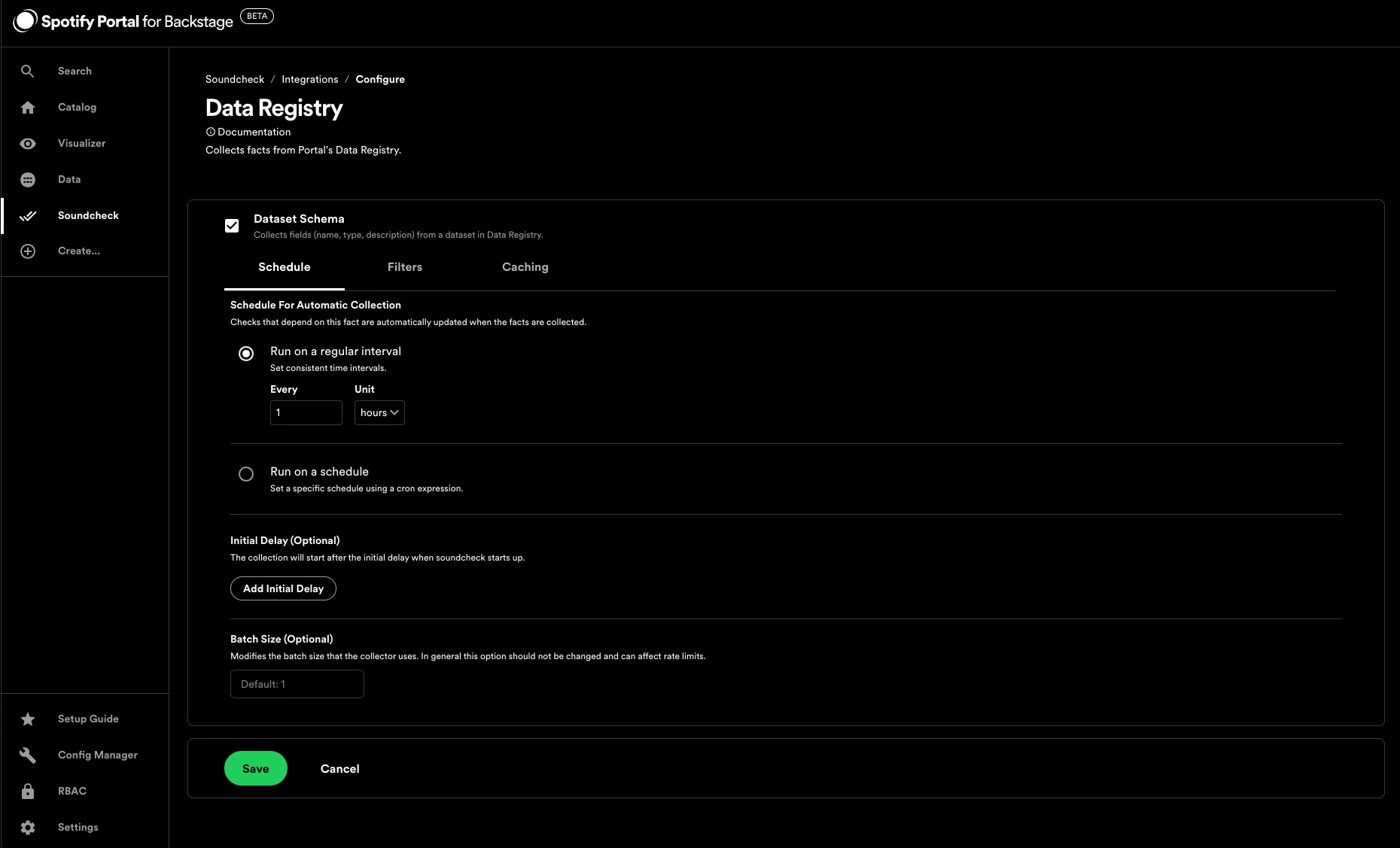
To enable the Data Registry Integration, go to `Soundcheck > Integrations > Data Registry` and click the `Configure` button. To learn more about the No-Code UI config, see the [Configuring a fact collector (integration) via the no-code UI](../index#configuring-a-fact-collector-integration-via-the-no-code-ui).
By default, the `dataset-schema` check is filtered to Kind:Api, Type:dataset entities, and runs on a one hour interval.
 ### YAML Configuration Option
Add a `soundcheck.collectors.date-registry.collects` field to the `app-config.yaml`.
A simple example Catalog fact collector is listed below.
```yaml theme={"theme":{"light":"github-light","dark":"dracula"}}
# app-config.yaml
soundcheck:
collectors:
data-registry:
collects:
type: 'dataset-schema'
filter:
- spec.type: 'dataset'
frequency:
hours: 1
cache: false
```
## Defining Data Registry Fact Collections
This section describes the data shape and semantics of Data Registry Fact Collection configurations.
### Shape Of A Data Registry Fact Collection Configuration
The following is an example of a Data Registry Fact Collection Configuration in YAML:
```yaml theme={"theme":{"light":"github-light","dark":"dracula"}}
soundcheck:
collectors:
data-registry:
collects:
type: 'dataset-schema'
filter:
kind: api
spec.type: dataset
cache: false
```
Below are the details for each field.
#### `type` \[required]
The type of the collector: `dataset-schema`.
#### `frequency` \[optional]
The frequency at which the fact collection should be executed. Possible values are either a cron expression `{ cron: ... }` or [HumanDuration](https://backstage.io/docs/reference/types.humanduration).
If not provided, the fact will only be collected on demand.
Example:
```yaml theme={"theme":{"light":"github-light","dark":"dracula"}}
frequency:
minutes: 10
```
#### `initialDelay` \[optional]
The amount of time that should pass before the first invocation happens. Possible values are either a cron expression `{ cron: ... }` or [HumanDuration](https://backstage.io/docs/reference/types.humanduration).
Example:
```yaml theme={"theme":{"light":"github-light","dark":"dracula"}}
initialDelay:
seconds: 30
```
#### `batchSize` \[optional]
The number of entities to collect facts for at once. Optional, the default value is 1.
Example:
```yaml theme={"theme":{"light":"github-light","dark":"dracula"}}
batchSize: 100
```
#### `filter` \[optional]
A filter specifying which entities to collect the specified facts for. Matches the [filter format](https://backstage.io/docs/reference/catalog-client.entityfilterquery) used by the Catalog API.
The `dataset-schema` fact in particular is only relevant to datasets, and so by default the No-Code UI has filters for Kind:Api, Type:dataset.
#### `exclude` \[optional]
Entities matching this filter will be skipped during the fact collection process. Can be used in combination with filter. Matches the [filter format](https://backstage.io/docs/reference/catalog-client.entityfilterquery) used by the Catalog API.
```yaml theme={"theme":{"light":"github-light","dark":"dracula"}}
filter:
- kind: component
exclude:
- spec.type: documentation
```
#### `cache` \[optional]
If the collected facts should be cached, and if so for how long. Possible values are either `true` or `false` or a nested `{ duration:` [HumanDuration](https://backstage.io/docs/reference/types.humanduration) `}` field.
If not provided, the fact will not be cached.
Example:
```yaml theme={"theme":{"light":"github-light","dark":"dracula"}}
cache:
duration:
hours: 24
```
### Shape of A Data Registry Fact
The shape of a Data Registry Fact is based on the [Fact Schema](/plugins/soundcheck/api-reference/facts/submit-facts#body-facts).
The following is an example of the collected `dataset-schema` fact:
```yaml theme={"theme":{"light":"github-light","dark":"dracula"}}
factRef: data-registry:default/dataset-schema
entityRef: component:default/test-dataset-1
data:
fields:
- name: user_id
type: varchar
description: unique identifier for the user
- name: num_connections
type: int2
description: number of connections associared with the user
timestamp: 2025-02-20T15:20:35Z
```
See Software Catalog's descriptor format [documentation](https://backstage.io/docs/features/software-catalog/descriptor-format) for more details about the shape of an entity.
### Shape of A Data Registry Check
The shape of a Data Registry Check matches the [Shape of a Check](https://backstage.spotify.com/docs/plugins/soundcheck/core-concepts/checks#overall-shape-of-a-check).
The following is an example of a Data Registry check:
```yaml theme={"theme":{"light":"github-light","dark":"dracula"}}
- id: all_dataset_fields_have_descriptions
rule:
all:
- factRef: data-registry:default/dataset-schema
path: $.fields[*].description
operator: all:matches
value: .+
schedule:
frequency:
cron: '* * * * *'
filter:
kind: 'Api'
passedMessage: |
All fields in the dataset schema have a populated description!
failedMessage: |
At least one field in the dataset schema has an empty string for the description.
```
### YAML Configuration Option
Add a `soundcheck.collectors.date-registry.collects` field to the `app-config.yaml`.
A simple example Catalog fact collector is listed below.
```yaml theme={"theme":{"light":"github-light","dark":"dracula"}}
# app-config.yaml
soundcheck:
collectors:
data-registry:
collects:
type: 'dataset-schema'
filter:
- spec.type: 'dataset'
frequency:
hours: 1
cache: false
```
## Defining Data Registry Fact Collections
This section describes the data shape and semantics of Data Registry Fact Collection configurations.
### Shape Of A Data Registry Fact Collection Configuration
The following is an example of a Data Registry Fact Collection Configuration in YAML:
```yaml theme={"theme":{"light":"github-light","dark":"dracula"}}
soundcheck:
collectors:
data-registry:
collects:
type: 'dataset-schema'
filter:
kind: api
spec.type: dataset
cache: false
```
Below are the details for each field.
#### `type` \[required]
The type of the collector: `dataset-schema`.
#### `frequency` \[optional]
The frequency at which the fact collection should be executed. Possible values are either a cron expression `{ cron: ... }` or [HumanDuration](https://backstage.io/docs/reference/types.humanduration).
If not provided, the fact will only be collected on demand.
Example:
```yaml theme={"theme":{"light":"github-light","dark":"dracula"}}
frequency:
minutes: 10
```
#### `initialDelay` \[optional]
The amount of time that should pass before the first invocation happens. Possible values are either a cron expression `{ cron: ... }` or [HumanDuration](https://backstage.io/docs/reference/types.humanduration).
Example:
```yaml theme={"theme":{"light":"github-light","dark":"dracula"}}
initialDelay:
seconds: 30
```
#### `batchSize` \[optional]
The number of entities to collect facts for at once. Optional, the default value is 1.
Example:
```yaml theme={"theme":{"light":"github-light","dark":"dracula"}}
batchSize: 100
```
#### `filter` \[optional]
A filter specifying which entities to collect the specified facts for. Matches the [filter format](https://backstage.io/docs/reference/catalog-client.entityfilterquery) used by the Catalog API.
The `dataset-schema` fact in particular is only relevant to datasets, and so by default the No-Code UI has filters for Kind:Api, Type:dataset.
#### `exclude` \[optional]
Entities matching this filter will be skipped during the fact collection process. Can be used in combination with filter. Matches the [filter format](https://backstage.io/docs/reference/catalog-client.entityfilterquery) used by the Catalog API.
```yaml theme={"theme":{"light":"github-light","dark":"dracula"}}
filter:
- kind: component
exclude:
- spec.type: documentation
```
#### `cache` \[optional]
If the collected facts should be cached, and if so for how long. Possible values are either `true` or `false` or a nested `{ duration:` [HumanDuration](https://backstage.io/docs/reference/types.humanduration) `}` field.
If not provided, the fact will not be cached.
Example:
```yaml theme={"theme":{"light":"github-light","dark":"dracula"}}
cache:
duration:
hours: 24
```
### Shape of A Data Registry Fact
The shape of a Data Registry Fact is based on the [Fact Schema](/plugins/soundcheck/api-reference/facts/submit-facts#body-facts).
The following is an example of the collected `dataset-schema` fact:
```yaml theme={"theme":{"light":"github-light","dark":"dracula"}}
factRef: data-registry:default/dataset-schema
entityRef: component:default/test-dataset-1
data:
fields:
- name: user_id
type: varchar
description: unique identifier for the user
- name: num_connections
type: int2
description: number of connections associared with the user
timestamp: 2025-02-20T15:20:35Z
```
See Software Catalog's descriptor format [documentation](https://backstage.io/docs/features/software-catalog/descriptor-format) for more details about the shape of an entity.
### Shape of A Data Registry Check
The shape of a Data Registry Check matches the [Shape of a Check](https://backstage.spotify.com/docs/plugins/soundcheck/core-concepts/checks#overall-shape-of-a-check).
The following is an example of a Data Registry check:
```yaml theme={"theme":{"light":"github-light","dark":"dracula"}}
- id: all_dataset_fields_have_descriptions
rule:
all:
- factRef: data-registry:default/dataset-schema
path: $.fields[*].description
operator: all:matches
value: .+
schedule:
frequency:
cron: '* * * * *'
filter:
kind: 'Api'
passedMessage: |
All fields in the dataset schema have a populated description!
failedMessage: |
At least one field in the dataset schema has an empty string for the description.
```