> ## Documentation Index
> Fetch the complete documentation index at: https://backstage.spotify.com/docs/llms.txt
> Use this file to discover all available pages before exploring further.
# Catalog
> Use the built-in Catalog integration to expose Software Catalog entity metadata as facts for Soundcheck compliance checks.
The Catalog integration is installed by default and exposes information from Backstage's Software Catalog
as facts to Soundcheck.
This enables the creation of [checks](../../checks) against an entity's metadata, to ensure that it is in compliance
with your organizations standards and best practices.
It supports the collection of the following fact:
* `entity_descriptor` - contains information about Backstage's Software Catalog entity.
## Prerequisites
### Configure Software Catalog in Backstage
Software Catalog is configured at the root level of `app-config.yaml`. Here's an example configuration for Software Catalog:
```yaml theme={"theme":{"light":"github-light","dark":"dracula"}}
catalog:
locations:
- type: url
target: https://github.com/backstage/backstage/blob/master/packages/catalog-model/examples/components/artist-lookup-component.yaml
```
Consult the Software Catalog Configuration [documentation](https://backstage.io/docs/features/software-catalog/configuration) for additional details on setting up the Software Catalog.
## Catalog Fact Collector Configuration
The collection of Catalog facts is driven by configuration. To learn more about the configuration, consult the [Defining Catalog Fact Collectors](#defining-catalog-fact-collectors) section.
Catalog Fact Collector can be configured via YAML or No-Code UI. If you configure it via both YAML and No-Code UI, the configurations will be merged.
It's preferable to choose a single source for the Fact Collectors configuration (either No-Code UI or YAML) to avoid confusing merge results.
### No-Code UI Configuration Option
1. Make sure the prerequisite [Configure Software Catalog in Backstage](#configure-software-catalog-in-backstage) is completed.
2. To enable the Catalog Integration, go to `Soundcheck > Integrations > Software Catalog` and click the `Configure` button. To learn more about the No-Code UI config, see the [Configuring a fact collector (integration) via the no-code UI](../index#configuring-a-fact-collector-integration-via-the-no-code-ui).
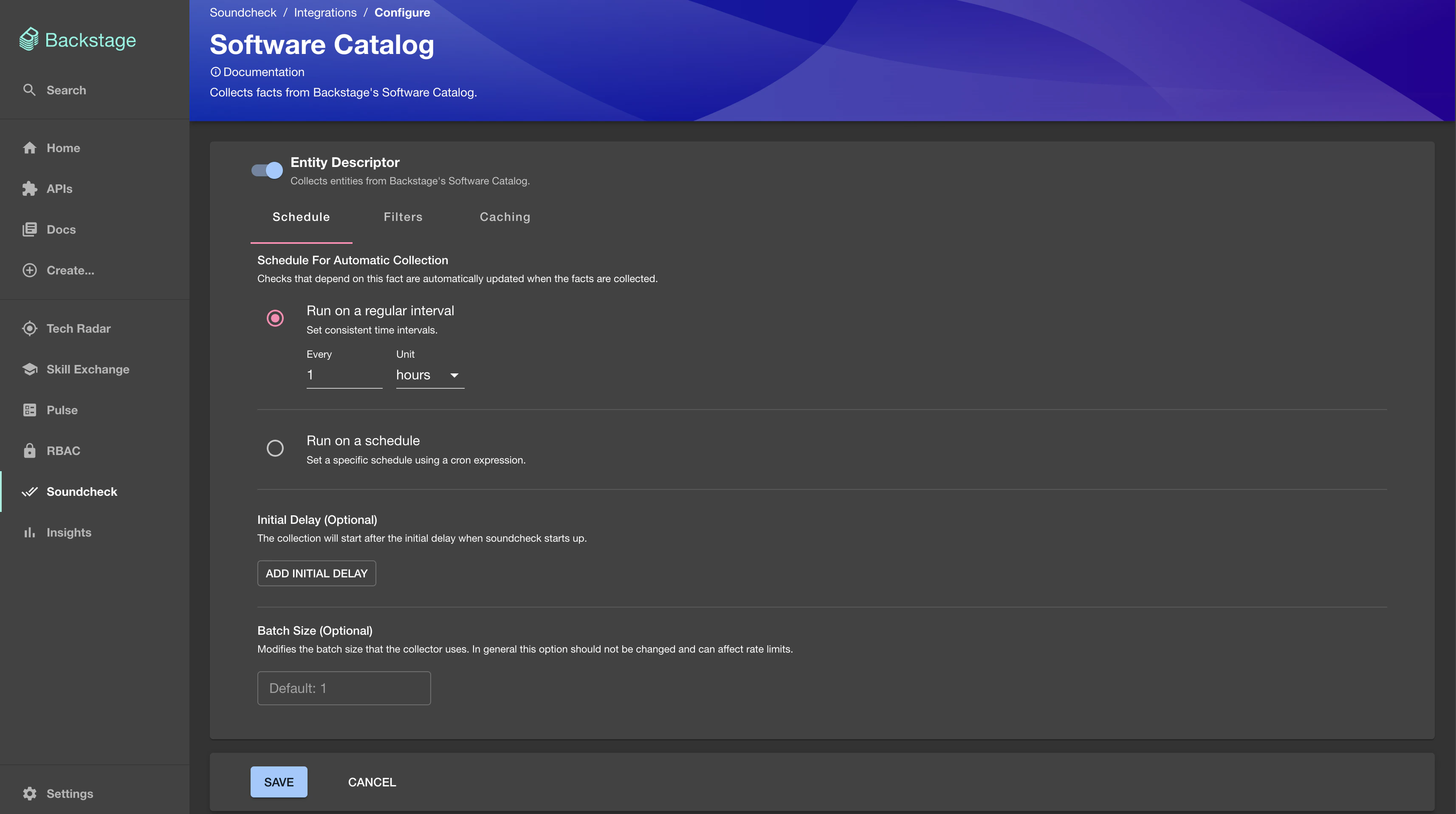 ### YAML Configuration Option
Add a `soundcheck.collectors.catalog.collects` field to the `app-config.yaml`.
A simple example Catalog fact collector is listed below.
```yaml theme={"theme":{"light":"github-light","dark":"dracula"}}
# app-config.yaml
soundcheck:
collectors:
catalog:
collects:
type: 'entity_descriptor'
filter:
kind: component
exclude:
spec.type: documentation
cache: false
```
## Defining Catalog Fact Collectors
This section describes the data shape and semantics of Catalog Fact Collectors.
### Shape Of A Catalog Fact Collector
The following is an example of a Catalog Fact Collector YAML configuration:
```yaml theme={"theme":{"light":"github-light","dark":"dracula"}}
soundcheck:
collectors:
catalog:
collects:
type: 'entity_descriptor'
filter:
kind: component
exclude:
spec.type: documentation
cache: false
```
Below are the details for each field.
#### `type` \[required]
The type of the collector: `entity_descriptor`.
#### `frequency` \[optional]
The frequency at which the fact collection should be executed. Possible values are either a cron expression `{ cron: ... }` or [HumanDuration](https://backstage.io/docs/reference/types.humanduration).
If not provided, the fact will only be collected on demand.
Example:
```yaml theme={"theme":{"light":"github-light","dark":"dracula"}}
frequency:
minutes: 10
```
#### `initialDelay` \[optional]
The amount of time that should pass before the first invocation happens. Possible values are either a cron expression `{ cron: ... }` or [HumanDuration](https://backstage.io/docs/reference/types.humanduration).
Example:
```yaml theme={"theme":{"light":"github-light","dark":"dracula"}}
initialDelay:
seconds: 30
```
#### `batchSize` \[optional]
The number of entities to collect facts for at once. Optional, the default value is 1.
Example:
```yaml theme={"theme":{"light":"github-light","dark":"dracula"}}
batchSize: 100
```
#### `filter` \[optional]
A filter specifying which entities to collect the specified facts for. Matches the [filter format](https://backstage.io/docs/reference/catalog-client.entityfilterquery) used by the Catalog API.
If not provided, the fact will be collected for all entities.
#### `exclude` \[optional]
Entities matching this filter will be skipped during the fact collection process. Can be used in combination with filter. Matches the [filter format](https://backstage.io/docs/reference/catalog-client.entityfilterquery) used by the Catalog API.
```yaml theme={"theme":{"light":"github-light","dark":"dracula"}}
filter:
- kind: component
exclude:
- spec.type: documentation
```
#### `cache` \[optional]
If the collected facts should be cached, and if so for how long. Possible values are either `true` or `false` or a nested `{ duration:` [HumanDuration](https://backstage.io/docs/reference/types.humanduration) `}` field.
If not provided, the fact will not be cached.
Example:
```yaml theme={"theme":{"light":"github-light","dark":"dracula"}}
cache:
duration:
hours: 24
```
### Shape of A Catalog Fact
The shape of a Catalog Fact is based on the [Fact Schema](/plugins/soundcheck/api-reference/facts/submit-facts#body-facts).
The following is an example of the collected Catalog fact:
```yaml theme={"theme":{"light":"github-light","dark":"dracula"}}
factRef: catalog:default/entity_descriptor
entityRef: component:default/artist-web
data:
apiVersion: backstage.io/v1alpha1
kind: Component
metadata:
name: artist-web
description: The place to be, for great artists
labels:
example.com/custom: custom_label_value
annotations:
example.com/service-discovery: artistweb
circleci.com/project-slug: github/example-org/artist-website
tags:
- java
links:
- url: https://admin.example-org.com
title: Admin Dashboard
icon: dashboard
type: admin-dashboard
spec:
type: website
lifecycle: production
owner: artist-relations-team
system: public-websites
timestamp: 2023-02-20T13:50:35Z
```
See Software Catalog's descriptor format [documentation](https://backstage.io/docs/features/software-catalog/descriptor-format) for more details about the shape of an entity.
### Shape of A Catalog Fact Check
The shape of a Catalog Fact Check matches the [Shape of a Fact Check](https://backstage.spotify.com/docs/plugins/soundcheck/core-concepts/checks#overall-shape-of-a-check).
The following is an example of the Catalog fact check:
```yaml theme={"theme":{"light":"github-light","dark":"dracula"}}
- id: has_required_tags
rule:
any:
- factRef: catalog:default/entity_descriptor
path: $.metadata.tags
operator: contains
value: java
- factRef: catalog:default/entity_descriptor
path: $.metadata.tags
operator: contains
value: data
schedule:
frequency:
cron: '* * * * *'
filter:
kind: 'Component'
passedMessage: |
Tag found, check passed.
failedMessage: |
No `java` or `data` tag found, check failed.
```
### YAML Configuration Option
Add a `soundcheck.collectors.catalog.collects` field to the `app-config.yaml`.
A simple example Catalog fact collector is listed below.
```yaml theme={"theme":{"light":"github-light","dark":"dracula"}}
# app-config.yaml
soundcheck:
collectors:
catalog:
collects:
type: 'entity_descriptor'
filter:
kind: component
exclude:
spec.type: documentation
cache: false
```
## Defining Catalog Fact Collectors
This section describes the data shape and semantics of Catalog Fact Collectors.
### Shape Of A Catalog Fact Collector
The following is an example of a Catalog Fact Collector YAML configuration:
```yaml theme={"theme":{"light":"github-light","dark":"dracula"}}
soundcheck:
collectors:
catalog:
collects:
type: 'entity_descriptor'
filter:
kind: component
exclude:
spec.type: documentation
cache: false
```
Below are the details for each field.
#### `type` \[required]
The type of the collector: `entity_descriptor`.
#### `frequency` \[optional]
The frequency at which the fact collection should be executed. Possible values are either a cron expression `{ cron: ... }` or [HumanDuration](https://backstage.io/docs/reference/types.humanduration).
If not provided, the fact will only be collected on demand.
Example:
```yaml theme={"theme":{"light":"github-light","dark":"dracula"}}
frequency:
minutes: 10
```
#### `initialDelay` \[optional]
The amount of time that should pass before the first invocation happens. Possible values are either a cron expression `{ cron: ... }` or [HumanDuration](https://backstage.io/docs/reference/types.humanduration).
Example:
```yaml theme={"theme":{"light":"github-light","dark":"dracula"}}
initialDelay:
seconds: 30
```
#### `batchSize` \[optional]
The number of entities to collect facts for at once. Optional, the default value is 1.
Example:
```yaml theme={"theme":{"light":"github-light","dark":"dracula"}}
batchSize: 100
```
#### `filter` \[optional]
A filter specifying which entities to collect the specified facts for. Matches the [filter format](https://backstage.io/docs/reference/catalog-client.entityfilterquery) used by the Catalog API.
If not provided, the fact will be collected for all entities.
#### `exclude` \[optional]
Entities matching this filter will be skipped during the fact collection process. Can be used in combination with filter. Matches the [filter format](https://backstage.io/docs/reference/catalog-client.entityfilterquery) used by the Catalog API.
```yaml theme={"theme":{"light":"github-light","dark":"dracula"}}
filter:
- kind: component
exclude:
- spec.type: documentation
```
#### `cache` \[optional]
If the collected facts should be cached, and if so for how long. Possible values are either `true` or `false` or a nested `{ duration:` [HumanDuration](https://backstage.io/docs/reference/types.humanduration) `}` field.
If not provided, the fact will not be cached.
Example:
```yaml theme={"theme":{"light":"github-light","dark":"dracula"}}
cache:
duration:
hours: 24
```
### Shape of A Catalog Fact
The shape of a Catalog Fact is based on the [Fact Schema](/plugins/soundcheck/api-reference/facts/submit-facts#body-facts).
The following is an example of the collected Catalog fact:
```yaml theme={"theme":{"light":"github-light","dark":"dracula"}}
factRef: catalog:default/entity_descriptor
entityRef: component:default/artist-web
data:
apiVersion: backstage.io/v1alpha1
kind: Component
metadata:
name: artist-web
description: The place to be, for great artists
labels:
example.com/custom: custom_label_value
annotations:
example.com/service-discovery: artistweb
circleci.com/project-slug: github/example-org/artist-website
tags:
- java
links:
- url: https://admin.example-org.com
title: Admin Dashboard
icon: dashboard
type: admin-dashboard
spec:
type: website
lifecycle: production
owner: artist-relations-team
system: public-websites
timestamp: 2023-02-20T13:50:35Z
```
See Software Catalog's descriptor format [documentation](https://backstage.io/docs/features/software-catalog/descriptor-format) for more details about the shape of an entity.
### Shape of A Catalog Fact Check
The shape of a Catalog Fact Check matches the [Shape of a Fact Check](https://backstage.spotify.com/docs/plugins/soundcheck/core-concepts/checks#overall-shape-of-a-check).
The following is an example of the Catalog fact check:
```yaml theme={"theme":{"light":"github-light","dark":"dracula"}}
- id: has_required_tags
rule:
any:
- factRef: catalog:default/entity_descriptor
path: $.metadata.tags
operator: contains
value: java
- factRef: catalog:default/entity_descriptor
path: $.metadata.tags
operator: contains
value: data
schedule:
frequency:
cron: '* * * * *'
filter:
kind: 'Component'
passedMessage: |
Tag found, check passed.
failedMessage: |
No `java` or `data` tag found, check failed.
```