> ## Documentation Index
> Fetch the complete documentation index at: https://backstage.spotify.com/docs/llms.txt
> Use this file to discover all available pages before exploring further.
# Check Exemptions
> Exempt specific components from checks when they are not applicable or cannot pass, with full audit logging of justifications and creators.
Soundcheck allows components to be exempted from checks. An exemption, in this context, means that the check
will not be executed for the exempted component and that the check is considered to be passing for that
component. This is useful for components that are not relevant to a check but that nonetheless are
selected by the check's filter, or for components that for whatever reason cannot pass the check but
should not be considered to be failing.
While the exemption functionality is intended to be used sparingly, Soundcheck makes no restrictions
on the number of exemptions that can be created.
*Note:* Like manual check entries, all exemptions are recorded in the Soundcheck audit logs, preserving
details like the justification for the exemption, the user who created it, and the time at which
it was created.
## Creating an Exemption
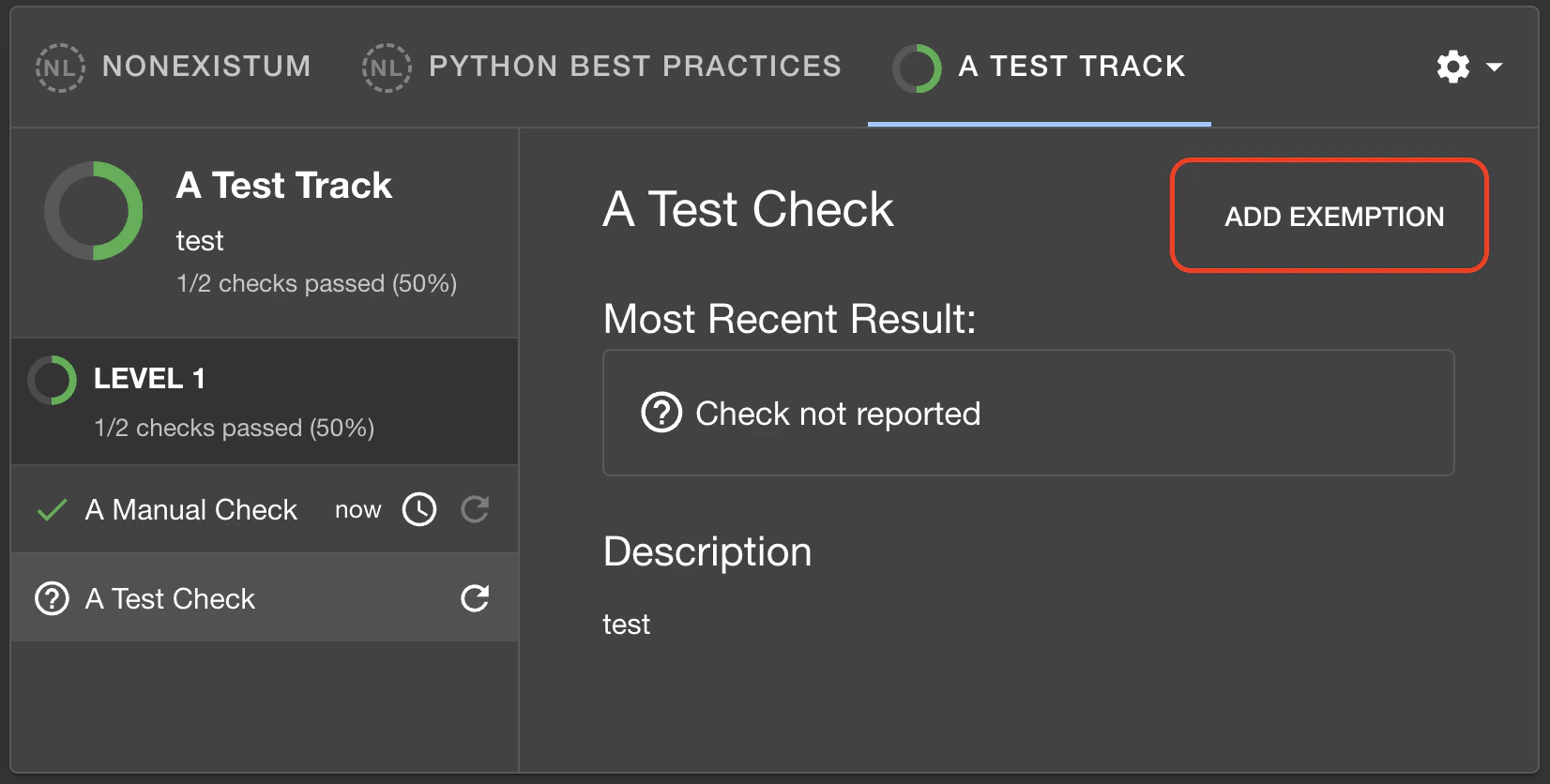
To exempt a component from a check, navigate to the entity's Soundcheck tab, select the track that
contains the check from which you wish to exempt the component, and click on the check to view its
details. In the details pane, click on the `Add Exemption` button in the top-right corner of the pane
(outlined in the image below):
 Clicking the button will open a pop-up to create the exemption. The exemption requires a justification:
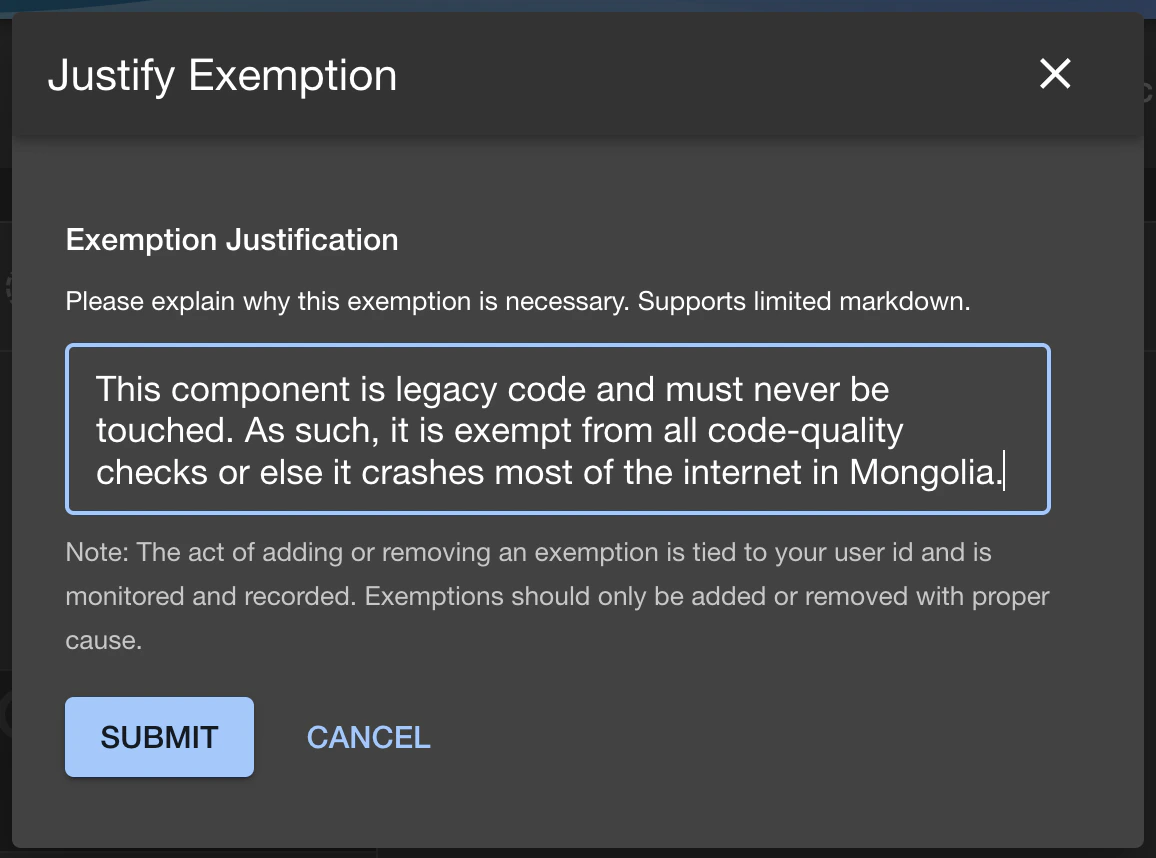 Once the exemption is created, the check will be considered to be passing for the exempted component,
but will not be show in the list by default. To view the exemption, click on the small gear icon
beside the list of Tracks for the component, and select `Show Exempt Checks`:
Once the exemption is created, the check will be considered to be passing for the exempted component,
but will not be show in the list by default. To view the exemption, click on the small gear icon
beside the list of Tracks for the component, and select `Show Exempt Checks`:
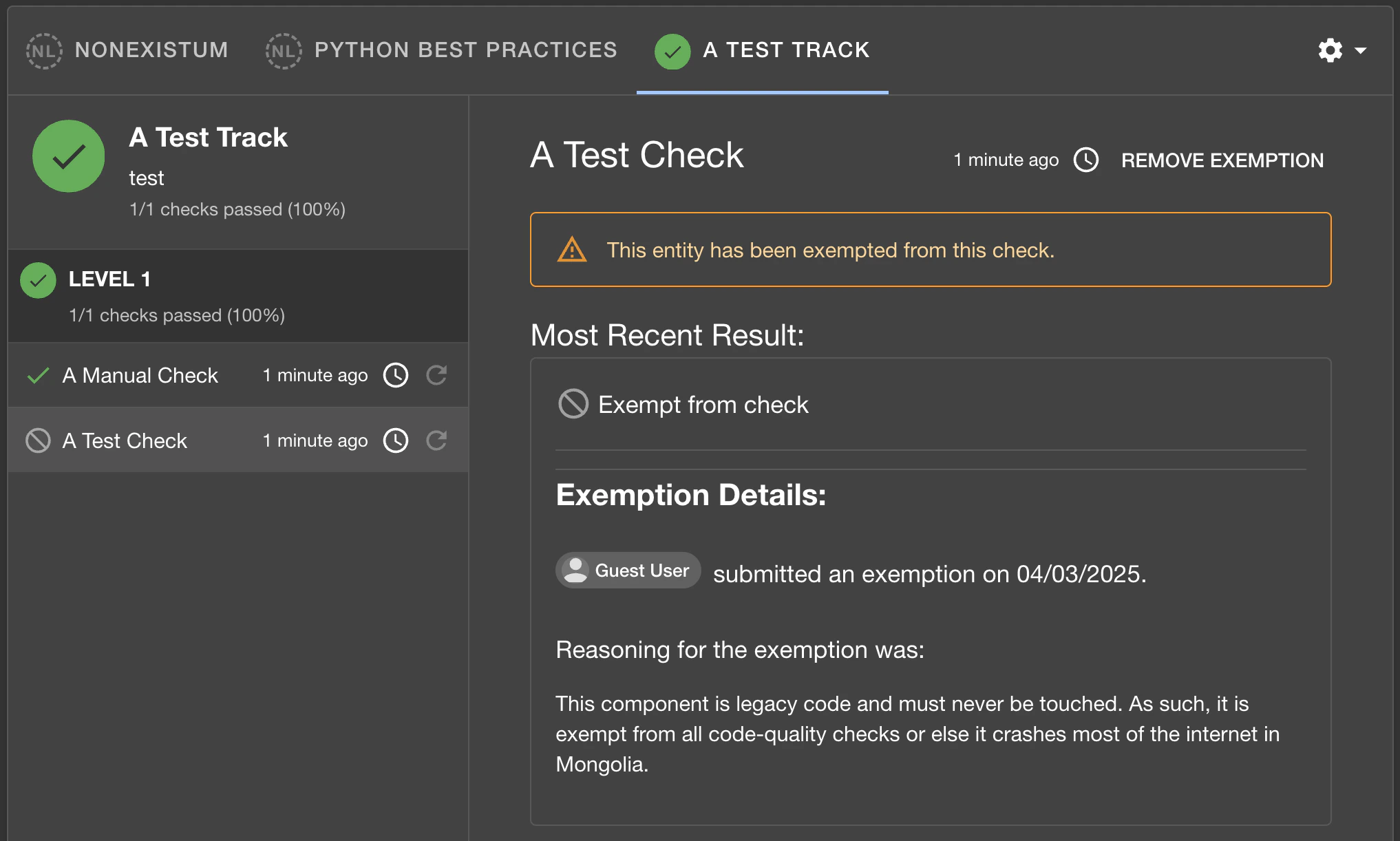
 Now the exemption will be shown in the list of checks for the component, along with an alert that
the component is indeed exempt from the check:
Now the exemption will be shown in the list of checks for the component, along with an alert that
the component is indeed exempt from the check:
 ## Removing an Exemption
Removing an exemption permanently deletes the exemption record. The component will no longer be
considered exempt and the check will begin evaluating against it again. Exemptions can be removed
from the UI or via the REST API.
If you want to disable an exemption while preserving an audit trail and the ability to re-activate
it later, use **Revoke** instead (see below).
## Revoking an Exemption
Revoking an exemption disables it without permanently deleting it. The revoked exemption remains visible
in the exemptions table with a "Revoked" status, and the full audit trail (who revoked it, when, and why)
is preserved. Exemptions can be revoked from the UI or via the REST API.
A revoked exemption prevents a new exemption from being created for the same check and component
until it is restored. The revocation dialog requires a reason explaining why the exemption is being revoked.
## Restoring a Revoked Exemption
Restoring a revoked exemption re-activates it, returning the component to its exempted state.
Exemptions can be restored from the UI or via the REST API.
## Permissions
The exemption functionality uses the `soundcheck.entity.exemptions.update` permission for all
exemption operations -- creating, removing, revoking, and restoring. This is a resource permission,
and so can have a policy set based on the component for which an exemption is being managed.
A common use case may be "allow only the owner of the component to modify exemptions for it".
By default, this permission is granted by RBAC unless a policy has been set to deny it.
## Removing an Exemption
Removing an exemption permanently deletes the exemption record. The component will no longer be
considered exempt and the check will begin evaluating against it again. Exemptions can be removed
from the UI or via the REST API.
If you want to disable an exemption while preserving an audit trail and the ability to re-activate
it later, use **Revoke** instead (see below).
## Revoking an Exemption
Revoking an exemption disables it without permanently deleting it. The revoked exemption remains visible
in the exemptions table with a "Revoked" status, and the full audit trail (who revoked it, when, and why)
is preserved. Exemptions can be revoked from the UI or via the REST API.
A revoked exemption prevents a new exemption from being created for the same check and component
until it is restored. The revocation dialog requires a reason explaining why the exemption is being revoked.
## Restoring a Revoked Exemption
Restoring a revoked exemption re-activates it, returning the component to its exempted state.
Exemptions can be restored from the UI or via the REST API.
## Permissions
The exemption functionality uses the `soundcheck.entity.exemptions.update` permission for all
exemption operations -- creating, removing, revoking, and restoring. This is a resource permission,
and so can have a policy set based on the component for which an exemption is being managed.
A common use case may be "allow only the owner of the component to modify exemptions for it".
By default, this permission is granted by RBAC unless a policy has been set to deny it.